
Reminder Chrome 插件, crx 扩展下载
Reminds you about your todos via desktop notifications
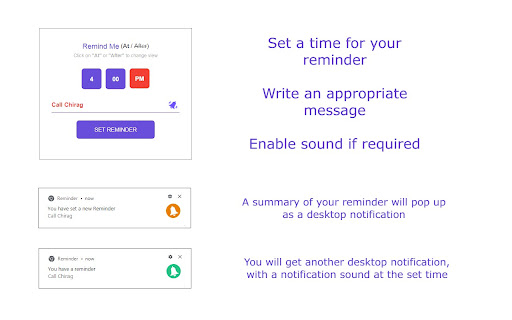
All you have to do is set a time and a message, and Reminder will nudge you regarding the same.
Most of us always have the web browser open in front of us which make this an ideal extension tool for you.
"Reminder" never forgets to remind you about your useful commitments.
Reminder has two modes
1. Remind me at
Specify what time of the day you would like to see the reminder message.
2. Remind me after
Specify the duration (in hours and mins) after which you would like to see the reminder message.
Extra Bonus: Please notice the bell icon next to the message box. Click once, to turn on the sound.
A notification sound will be played along with the message.
COMING SOON!
1. Provision to set a date for reminders
2. Repeat reminder every day/week/month/year
| 分类 | 📝工作流程与规划 |
| 插件标识 | acclkpakfhclgnilbcclfpmgcoalbcmk |
| 平台 | Chrome |
| 评分 |
☆☆☆☆☆
|
| 评分人数 | |
| 插件主页 | https://chromewebstore.google.com/detail/reminder/acclkpakfhclgnilbcclfpmgcoalbcmk |
| 版本号 | 25.2.3.0 |
| 大小 | 256KiB |
| 官网下载次数 | 78 |
| 下载地址 | |
| 更新时间 | 2020-10-23 00:00:00 |
CRX扩展文件安装方法
第1步: 打开Chrome浏览器的扩展程序
第2步:
在地址栏输入: chrome://extensions/
第3步: 开启右上角的【开发者模式】
第4步: 重启Chrome浏览器 (重要操作)
第5步: 重新打开扩展程序管理界面
第6步: 将下载的crx文件直接拖入页面完成安装
注意:请确保使用最新版本的Chrome浏览器