
HyperG - Automatic Hyperlinks In Gmail Chrome 插件, crx 扩展下载

HyperG - Automatic Hyperlinks In Gmail
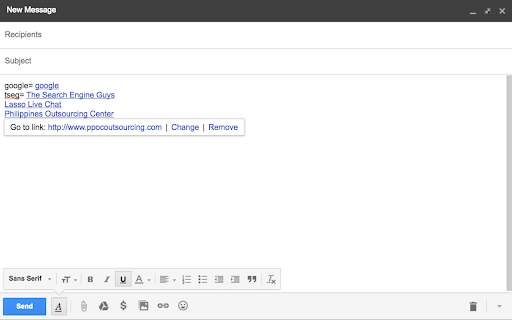
Automatically create hyperlinks in gmail. This extension will save you a ton of time
Simply type a word or phrase and HyperG will automatically convert it into a hyperlink.
Great for creating email signatures, affiliate links, commonly used words or phrases.
Examples:
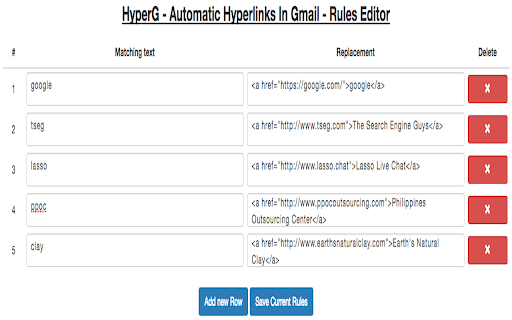
- add matching text "google" with replacement of "<a href="https://google.com/">google</a>" will automatically link to "http://www.google.com/"
- adding matching text "tseg" with replacement of <a href="https://www.tseg.com/">The Search Engine Guys</a> will automatically link to "http://www.tseg.com/"
Just make sure to use html in the replacement box.
Enjoy!
| 分类 | 📝工作流程与规划 |
| 插件标识 | achofajdllpmammddgfibkchijpgepgo |
| 平台 | Chrome |
| 评分 |
☆☆☆☆☆
|
| 评分人数 | |
| 插件主页 | https://chromewebstore.google.com/detail/hyperg-automatic-hyperlin/achofajdllpmammddgfibkchijpgepgo |
| 版本号 | 2.0.2.5 |
| 大小 | 188KiB |
| 官网下载次数 | 281 |
| 下载地址 | |
| 更新时间 | 2017-04-14 00:00:00 |
CRX扩展文件安装方法
第1步: 打开Chrome浏览器的扩展程序
第2步:
在地址栏输入: chrome://extensions/
第3步: 开启右上角的【开发者模式】
第4步: 重启Chrome浏览器 (重要操作)
第5步: 重新打开扩展程序管理界面
第6步: 将下载的crx文件直接拖入页面完成安装
注意:请确保使用最新版本的Chrome浏览器