
Trello-Office Chrome 插件, crx 扩展下载
project management and time tracking based on trello
This services is intended to enable you to log time on your tasks you use in trello.
We are now in a kind of beta state, but the target of the project is to create a add on to trello that has the following features within the environment of the trello homepage:
- time logging per ticket
- time estimations per ticket
- burndown charts per board
- on page reports, monthly reports and exports to excel
We have attached 4 Screens that show what you can do right now, more to come soon:
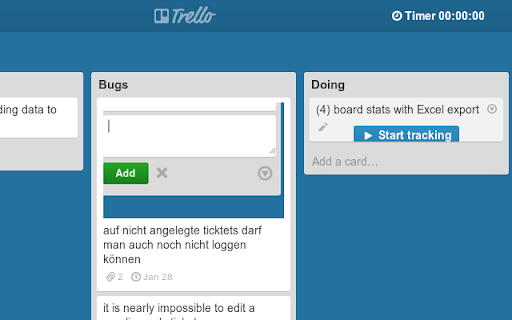
Screen 1:
here you can start logging
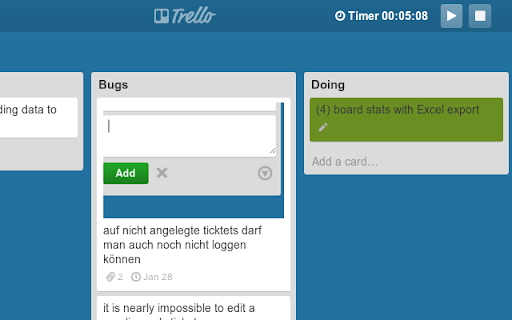
Screen 2:
the active item is colored in green
you can pause logging and continue it later
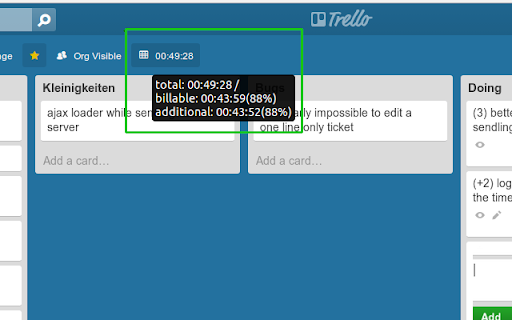
Screen 3:
in the status bar you can see how many
hours have been logged on this board
just click on this to export an excel
sheet with all time records
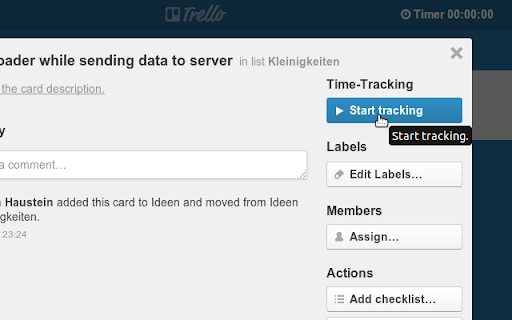
Screen 4:
in the details overlay there is now also
a button to start a time log
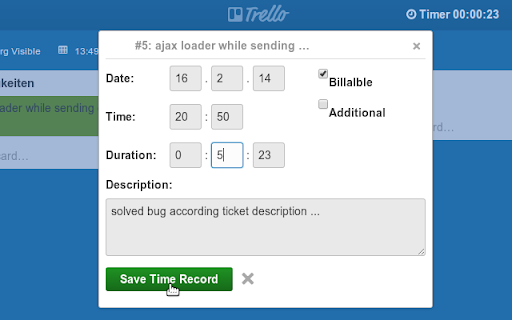
Screen 5:
with the brand new save dialog you can
edit the Date, time and duration, flag
"billable" and "additional" and add a
description on saving the time log entry
We are looking forward to get good inspirations from our users :-)
Change-Log:
v1.4: COMING SOON: easy way to add time estimations for burn down chart.
v1.3.1: (27 Mar 2015) Bugfix Release: Fixed some Bugs in the API.
v1.3: (16 Feb 2014)Better save-record dialog and start button in details overlay
v1.2: (02 Feb 2014) Export function and an time sum in the status bar of each board
v1.1: (26 Jan 2014) Initial public release
| 分类 | 💻开发者工具 |
| 插件标识 | adplchojbnceleieilggnpceikjeapjg |
| 平台 | Chrome |
| 评分 |
☆☆☆☆☆
|
| 评分人数 | |
| 插件主页 | https://chromewebstore.google.com/detail/trello-office/adplchojbnceleieilggnpceikjeapjg |
| 版本号 | 8.3 |
| 大小 | 93.21KiB |
| 官网下载次数 | 2000 |
| 下载地址 | |
| 更新时间 | 2015-03-27 00:00:00 |
CRX扩展文件安装方法
第1步: 打开Chrome浏览器的扩展程序
第2步:
在地址栏输入: chrome://extensions/
第3步: 开启右上角的【开发者模式】
第4步: 重启Chrome浏览器 (重要操作)
第5步: 重新打开扩展程序管理界面
第6步: 将下载的crx文件直接拖入页面完成安装
注意:请确保使用最新版本的Chrome浏览器