
Key Master Chrome 插件, crx 扩展下载
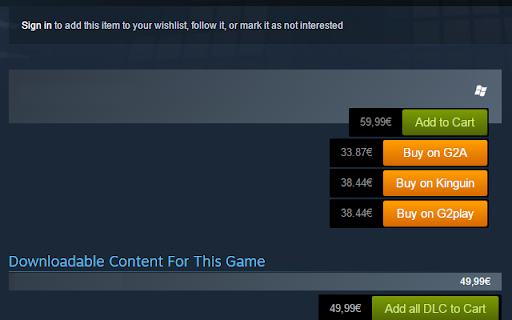
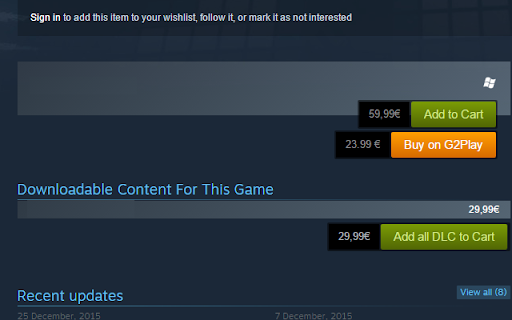
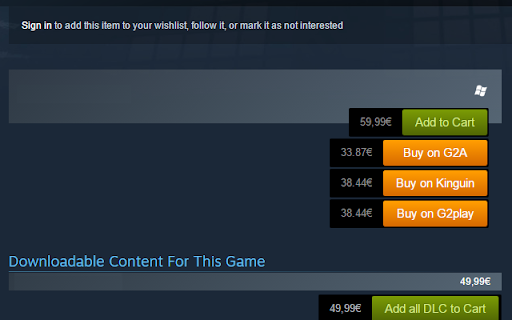
Key Master is an on page key price checker for the Steam store supporting G2Play, G2A and Kinguin
Key master makes it easy to check game pricing without leaving the Steam store page. It provides a link to the relevant page on the G2Play and G2A key market platforms to make the transition easier between these stores. Just open a game on the Steam store, and after a second you'll notice the big yellow buttons underneath the Steam "add to cart" button!
--Currently in public beta--
FAQ:
-Are these sites trustworthy?
They are nothing but a digital distribution site for keys. If you have no concerns buying keys on Amazon, they shouldn't cause any worries.
- How does it work?
On the backend I made an API that gets the prices of these games in realtime. It is essential to get the price in realtime because it fluctuates a lot.
-Could you implement "x" feature?
Send in your feature and I'll take a look at its feasability.
- The prce shown on my steam store page is extremely high. How come?
This means that the price was correctly scraped for your own currency but the currency sign is wrong. My apologies. I did not foresee this. I will tackle this bug ASAP.
This extension uses affiliate links to sustain the server and domain name this is hosted on. This will have no effect on the experience fidelity.
| 分类 | 🛍️购物 |
| 插件标识 | aealfaceeajkaclbgikjbmndohfadiok |
| 平台 | Chrome |
| 评分 |
☆☆☆☆☆
|
| 评分人数 | |
| 插件主页 | https://chromewebstore.google.com/detail/key-master/aealfaceeajkaclbgikjbmndohfadiok |
| 版本号 | 1.1.5 |
| 大小 | 2.45MiB |
| 官网下载次数 | 523 |
| 下载地址 | |
| 更新时间 | 2018-04-15 00:00:00 |
CRX扩展文件安装方法
第1步: 打开Chrome浏览器的扩展程序
第2步:
在地址栏输入: chrome://extensions/
第3步: 开启右上角的【开发者模式】
第4步: 重启Chrome浏览器 (重要操作)
第5步: 重新打开扩展程序管理界面
第6步: 将下载的crx文件直接拖入页面完成安装
注意:请确保使用最新版本的Chrome浏览器