
Permission Inspector Chrome 插件, crx 扩展下载
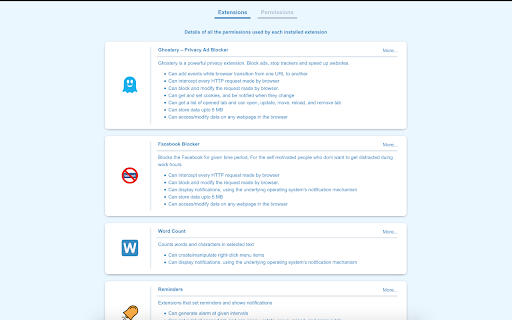
Snapshot of all the permissions used by each installed extension.
Missing permissions inspector for Chrome - Snapshot of all the permissions used by each installed extension.
Extension are powerful tools which can modify the browser using various features allowed by browser. While installing an Extension there is a permission prompt which tells what all features will be accessed by the Extension. Post that we have no way to know what an installed add-on is accessing. Permission inspector bridges this gap and shows what all an Extension can do to the browser.
There are two views for this add-on
Extension-wise: Shows permissions for each Extension.
Permission-wise: Shows add-ons using each permission.
This Extension is available in following languages:
de - German
en - English
es- Spanish
fr - French
hi - Hindi
it - Italian
nl - Dutch
pl - Polish
pt - Portugese
ru - Russian
zh - Chinese(S)
| 分类 | 💻开发者工具 |
| 插件标识 | ahfoecogpaccmnaiilgchbfemajmkcdi |
| 平台 | Chrome |
| 评分 |
☆☆☆☆☆
|
| 评分人数 | |
| 插件主页 | https://chromewebstore.google.com/detail/permission-inspector/ahfoecogpaccmnaiilgchbfemajmkcdi |
| 版本号 | 8.3 |
| 大小 | 81.9KiB |
| 官网下载次数 | 56 |
| 下载地址 | |
| 更新时间 | 2019-01-23 00:00:00 |
CRX扩展文件安装方法
第1步: 打开Chrome浏览器的扩展程序
第2步:
在地址栏输入: chrome://extensions/
第3步: 开启右上角的【开发者模式】
第4步: 重启Chrome浏览器 (重要操作)
第5步: 重新打开扩展程序管理界面
第6步: 将下载的crx文件直接拖入页面完成安装
注意:请确保使用最新版本的Chrome浏览器