
AmericanSearches Chrome 插件, crx 扩展下载
What is American Searches?
---------------------------------------------
With today’s modern media there is no single news source…
What is American Searches?
---------------------------------------------
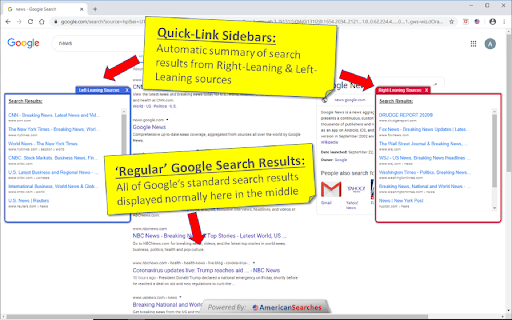
With today’s modern media there is no single news source that people from ALL political backgrounds trust to consistently and accurately present both sides of every story. So, AmericanSearches conveniently displays search results from BOTH Left-Leaning and Right-Leaning news sources in unobtrusive sidebars with conventional Google search results displayed in between.
How do I use it?
--------------------------
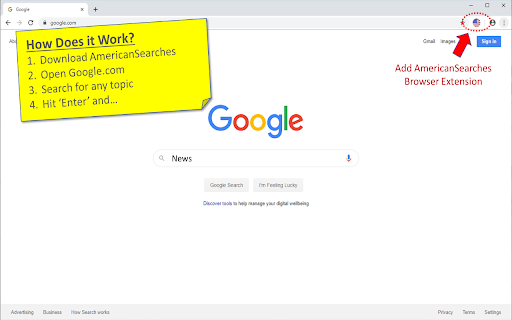
American Searches is a Google Chrome web browser extension. Click on the blue button above to ‘Add to Chrome’ (if you’re already using a Chrome web browser) or ‘Available on Chrome’ (if you’re using a different web browser, such as Microsoft Edge or Explorer) to install American Searches on your computer. Once it is installed, simply click on the American Searches icon in the upper right corner of your Google Chrome browser to get started (it will look like a small circle with an American flag). Go to Google.com, type any search term and American Searches Left/Right sidebars and sources will automatically appear alongside your normal Google search results.
Do I have to pay to use it?
-----------------------------------------
No, American Searches is provided as a free Public Service for those who are interested in preserving convenient access to – and awareness of – BOTH sides of every story or current event.
How does it work?
------------------------------
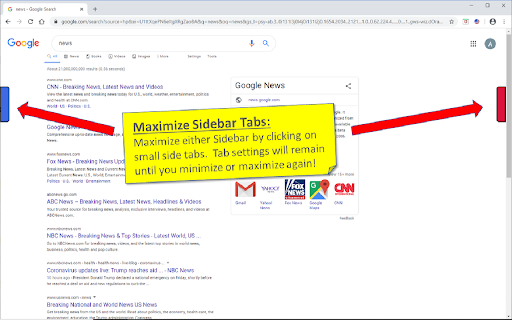
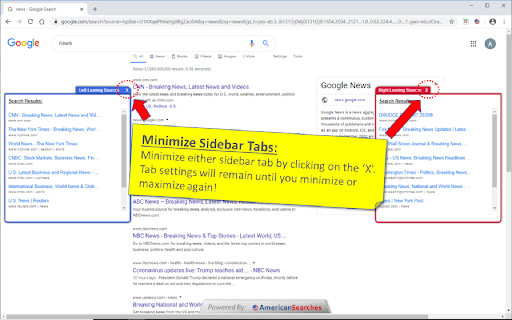
American Searches simply displays the most relevant search results (a summary list of titles and sources) from Left-Leaning sources in a blue sidebar window to the left of conventional Google search results, along with the most relevant search results from Right-Leaning sources in a red sidebar window on the other side. Summary results in each Left/Right sidebar contain ‘clickable’ links that you can explore at your leisure. You can also minimize or maximize one or both sidebars/tabs as needed.
Contact Us:
-------------------
[email protected]
| 分类 | 🛠️工具 |
| 插件标识 | aknpkdocbjlncilahajpaeeajibehflc |
| 平台 | Chrome |
| 评分 |
☆☆☆☆☆
|
| 评分人数 | |
| 插件主页 | https://chromewebstore.google.com/detail/americansearches/aknpkdocbjlncilahajpaeeajibehflc |
| 版本号 | 1.0.0.47 |
| 大小 | 870KiB |
| 官网下载次数 | 22 |
| 下载地址 | |
| 更新时间 | 2020-04-02 00:00:00 |
CRX扩展文件安装方法
第1步: 打开Chrome浏览器的扩展程序
第2步:
在地址栏输入: chrome://extensions/
第3步: 开启右上角的【开发者模式】
第4步: 重启Chrome浏览器 (重要操作)
第5步: 重新打开扩展程序管理界面
第6步: 将下载的crx文件直接拖入页面完成安装
注意:请确保使用最新版本的Chrome浏览器