
Alt+Up Chrome 插件, crx 扩展下载
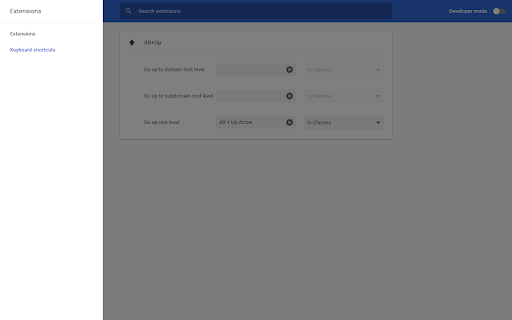
Go to parent address. Use Alt+Up to move up one level like in many file browsers.
Go to parent address. This means removing the page anchor (#xxx), query string (?xxx), file or the last directory (/xxx) or sub-domain (xxx.), whichever is first found (preserving mentioned order).
This extension is a fork of Przemysław Pawełczyk's otherwise excellent – but seemingly stalled – extension NavigUp 0.4.0. The major changes I've made are:
• Keyboard shortcuts will work as long as Chrome has focus. They don't require the actual page content to have the focus.
• Removed extension icon from cluttering the address bar
• Works on ftp:// and file:// schemes
• Extension requires less permissions
• SSL connections are no longer downgraded
• Optional keyboard shortcuts for going all the way up to the domain and subdomain address root level
== Shortcuts ==
Defaults to Alt+Up or Command+Up on Mac. The shortcuts for going all the way up to the domain and subdomain address root levels are by default unassigned. These shortcuts can be changed on the "Extensions" page's menu, under "Keyboard shortcuts."
== Permissions ==
"Access your tabs and browsing activity."
("tabs" permission)
The "tabs" permission is a broad one, but it is used only for setting the current tab's URL when the keyboard shortcut is used.
== License ==
Extension is licensed under Affero GPL v3.
== Version History ==
1.0.3
• Some code cleanup
1.0.2
• Added optional shortcut for going all the way up to the subdomain root address
1.0.1
• Future-proofing by replacing a deprecated function call
1.0.0
• Initial version
== Privacy Policy ==
This extension does not collect or share user data in any way.
| 分类 | 📝工作流程与规划 |
| 插件标识 | anfiimioedfkakckiolgkadafokljikc |
| 平台 | Chrome |
| 评分 |
☆☆☆☆☆
|
| 评分人数 | |
| 插件主页 | https://chromewebstore.google.com/detail/alt+up/anfiimioedfkakckiolgkadafokljikc |
| 版本号 | 25.2.3.0 |
| 大小 | 20.34KiB |
| 官网下载次数 | 171 |
| 下载地址 | |
| 更新时间 | 2018-10-02 00:00:00 |
CRX扩展文件安装方法
第1步: 打开Chrome浏览器的扩展程序
第2步:
在地址栏输入: chrome://extensions/
第3步: 开启右上角的【开发者模式】
第4步: 重启Chrome浏览器 (重要操作)
第5步: 重新打开扩展程序管理界面
第6步: 将下载的crx文件直接拖入页面完成安装
注意:请确保使用最新版本的Chrome浏览器