
Flickr Photo Actions on Threads Chrome 插件, crx 扩展下载
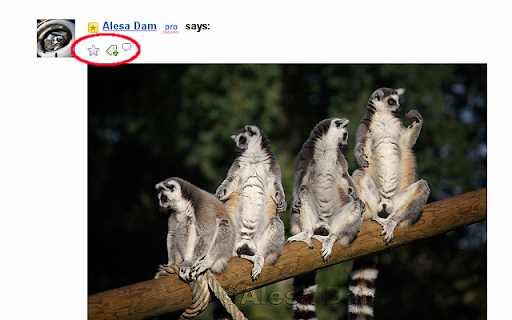
This extension provides buttons to tag, comment, or favorite Flickr photos posted in Flickr threads
The script provides a couple of buttons above each (Flickr) photo posted in Flickr threads, on photo pages, group pending items pages, and group pools.
The buttons allow to
. mark the photo as a Favorite
. add tags
. add a comment
When adding a comment, you can choose to add a 'referrer'.
The extension holds a list of your favorite comments, and most used tags. Comments and tags can be managed (define new, remove some, edit or copy existing comments/tags).
You can also mark a stored comment as a 'fast comment' (or a stored tag as a 'fast' tag). It will show above the photo as an icon, with the label and color you have set. This provides for one-click commenting/tagging.
| 分类 | 👥社交 |
| 插件标识 | aockpladnfogjkcohbmciemdcjdhcbkn |
| 平台 | Chrome |
| 评分 |
☆☆☆☆☆
|
| 评分人数 | |
| 插件主页 | https://chromewebstore.google.com/detail/flickr-photo-actions-on-t/aockpladnfogjkcohbmciemdcjdhcbkn |
| 版本号 | 3.128.4 |
| 大小 | 131KiB |
| 官网下载次数 | 95 |
| 下载地址 | |
| 更新时间 | 2013-08-22 00:00:00 |
CRX扩展文件安装方法
第1步: 打开Chrome浏览器的扩展程序
第2步:
在地址栏输入: chrome://extensions/
第3步: 开启右上角的【开发者模式】
第4步: 重启Chrome浏览器 (重要操作)
第5步: 重新打开扩展程序管理界面
第6步: 将下载的crx文件直接拖入页面完成安装
注意:请确保使用最新版本的Chrome浏览器