
FontScanner - Scan for font family names Chrome 插件, crx 扩展下载
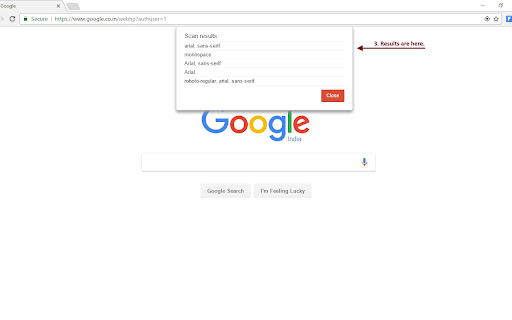
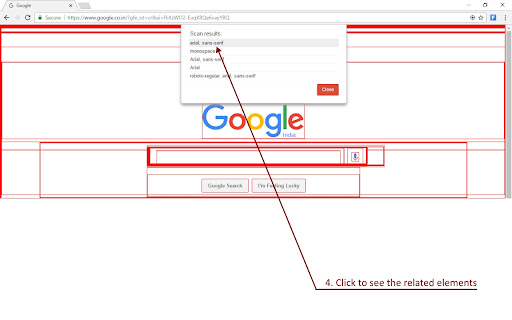
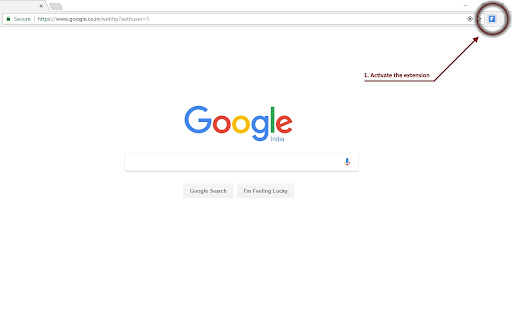
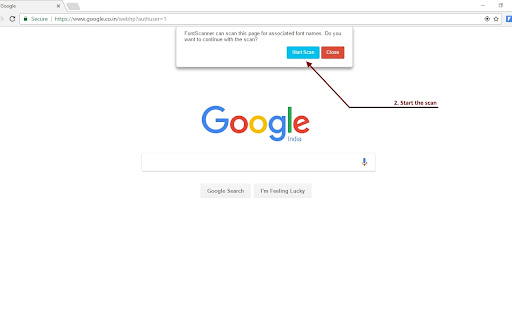
Scans the web page for font names to display the distinct font names applied on the page.
FontScanner helps in finding out the distinct font family names for the whole webpage, based on the properties set for each individual elements on the page. This will help the developers and testers to find those elements that are set with the wrong or undesired font family names, quickly.
From the page scan results, FontScanner can also show the elements related to a specific font name. This helps in identification of the specific element that has the undesired font name.
| 分类 | 💻开发者工具 |
| 插件标识 | aodilhmhlmomokijchbkajpoibenmakn |
| 平台 | Chrome |
| 评分 |
☆☆☆☆☆
|
| 评分人数 | |
| 插件主页 | https://chromewebstore.google.com/detail/fontscanner-scan-for-font/aodilhmhlmomokijchbkajpoibenmakn |
| 版本号 | 1.0.4 |
| 大小 | 47.22KiB |
| 官网下载次数 | 6000 |
| 下载地址 | |
| 更新时间 | 2021-02-05 00:00:00 |
CRX扩展文件安装方法
第1步: 打开Chrome浏览器的扩展程序
第2步:
在地址栏输入: chrome://extensions/
第3步: 开启右上角的【开发者模式】
第4步: 重启Chrome浏览器 (重要操作)
第5步: 重新打开扩展程序管理界面
第6步: 将下载的crx文件直接拖入页面完成安装
注意:请确保使用最新版本的Chrome浏览器