
Medium Code Highlighter Chrome 插件, crx 扩展下载


Add code syntax highlighting to Medium articles
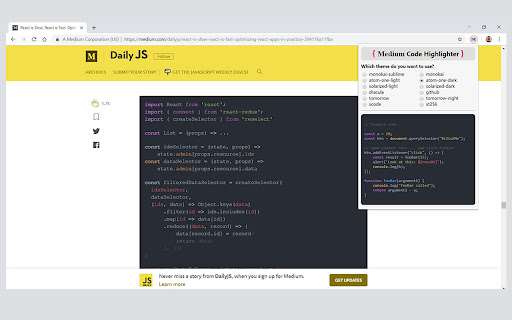
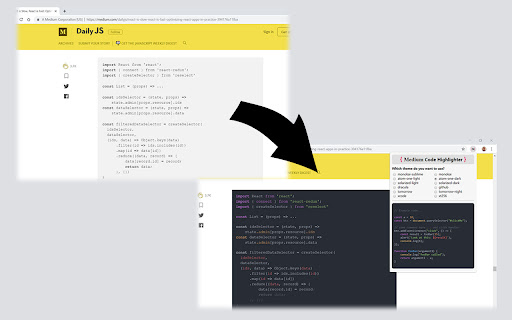
A chrome browser extension which adds code syntax highlighting to Medium articles.
Forget the black-on-gray blobs of code in articles which don't embed gists or images of code!
- Adds code syntax highlighting to '<pre>' blocks in Medium articles.
- Highlighting theme is selectable and can be changed on-the-fly (via extension popup upon icon-click) from a handful of popular themes.
-- Theme preference links to Chrome account.
- Works on all Medium articles, regardless of domain (i.e. 'medium.com', 'medium.freecodecamp.org', 'hackingandslacking.com', etc.)
*Note*
Due to Medium's innate formatting, code blocks are split line-by-line into '<pre>' blocks, meaning the 'highlightjs' language syntax recognizer may sometimes have trouble, but for the most part it works acceptably well.
| 分类 | 💻开发者工具 |
| 插件标识 | apdaagmhepellbjjbnaljaocodjjjjfd |
| 平台 | Chrome |
| 评分 |
☆☆☆☆☆
|
| 评分人数 | |
| 插件主页 | https://chromewebstore.google.com/detail/medium-code-highlighter/apdaagmhepellbjjbnaljaocodjjjjfd |
| 版本号 | 1.0.0 |
| 大小 | 86.32KiB |
| 官网下载次数 | 311 |
| 下载地址 | |
| 更新时间 | 2019-07-27 00:00:00 |
CRX扩展文件安装方法
第1步: 打开Chrome浏览器的扩展程序
第2步:
在地址栏输入: chrome://extensions/
第3步: 开启右上角的【开发者模式】
第4步: 重启Chrome浏览器 (重要操作)
第5步: 重新打开扩展程序管理界面
第6步: 将下载的crx文件直接拖入页面完成安装
注意:请确保使用最新版本的Chrome浏览器