
Lightning Admin Menu Chrome 插件, crx 扩展下载
A simple drop-down to make navigating Lightning a bit easier.
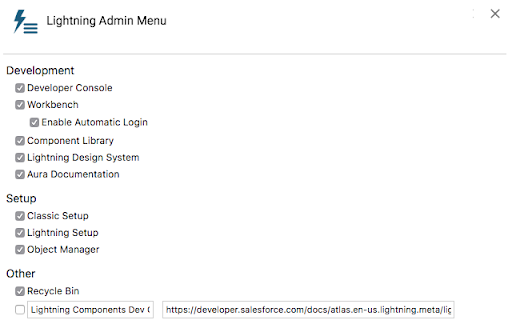
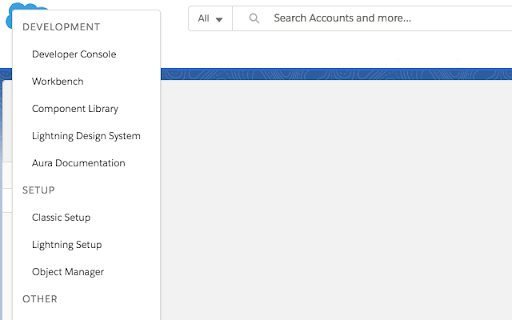
This extension creates a dropdown menu in Salesforce Lightning that makes it easier for administrators to navigate to various pages (e.g. Classic Setup, Recycle Bin, Workbench, etc.). Currently, the extension allows you to easily navigate to:
Development
- Developer Console
- Workbench (Including an automatic login feature)
- Component Library (unique to your org)
- Lightning Design System
- Aura Documentation
Setup
- Classic Setup (without requiring you to switch to Classic)
- Lightning Setup
- Object Manager
Other
- Recycle Bin
- Up to 5 custom URLs -- either full URLs (e.g. https://developer.salesforce.com) or relative URLs (e.g. /lightning/setup/ManageUsers/home)
System
- Switch to Classic
- Logout
The menu is be opened by clicking the Salesforce (or custom) logo in the Salesforce header on any Lightning page. Menu items can be shown/hidden through the "Options" dialog (right-click the icon and choose "Options...").
The extension requires access to Salesforce Lightning pages (to embed the menu) and Workbench pages (for the automatic login feature). No actual Salesforce data is ever read by the extension.
| 分类 | 📝工作流程与规划 |
| 插件标识 | apelhlenmamanenmgdafajgecjheomjf |
| 平台 | Chrome |
| 评分 |
☆☆☆☆☆
|
| 评分人数 | |
| 插件主页 | https://chromewebstore.google.com/detail/lightning-admin-menu/apelhlenmamanenmgdafajgecjheomjf |
| 版本号 | 1.8.1 |
| 大小 | 42.52KiB |
| 官网下载次数 | 144 |
| 下载地址 | |
| 更新时间 | 2018-08-24 00:00:00 |
CRX扩展文件安装方法
第1步: 打开Chrome浏览器的扩展程序
第2步:
在地址栏输入: chrome://extensions/
第3步: 开启右上角的【开发者模式】
第4步: 重启Chrome浏览器 (重要操作)
第5步: 重新打开扩展程序管理界面
第6步: 将下载的crx文件直接拖入页面完成安装
注意:请确保使用最新版本的Chrome浏览器