
Scrape Hawk Chrome 插件, crx 扩展下载
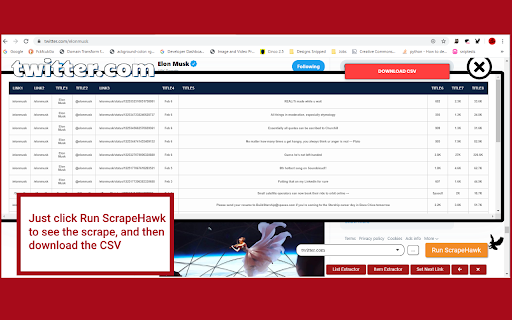

Scrape Hawk is the best point and click Scraper to get the info you need
Data is the oil of the 21st century. - Andrew Yang
Don't let huge corporations be the only ones getting insights from data on the web!
With Scrape Hawk data extraction is easy and accessible to anyone. Simply point and click at a list of items on any website and Scrape Hawk automatically does everything to turn it into organized data. There is no need for complicated rules or tediously clicking each item you want to extract... in Scrape Hawk all the images, links and text are automatically put into fields and ready to extract after just one button click. You can also specify Next page links, or individual item links to get additional data for an item.
### Other scrapers store YOUR DATA in the cloud!
Scrape Hawk is different - your computer (or your database) is the only place your scrape data belongs. That way you can be sure that any proprietary data sets you extract never touch someone else's servers.
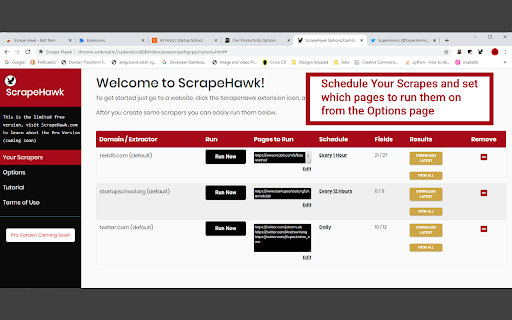
With Scrape Hawk you can now create as many scrapers as you want. Data from any scrape run can be downloaded as a csv file. In a future version you'll be able to send your scrape results to your database
This is the beta 1.0 release of Scrape Hawk so I'm looking for feedback on how I could make this free version better before offering a more full-featured Pro version that runs as a desktop application. If you wish to learn more about the product or support future development visit ScrapeHawk.com.
| 分类 | 📝工作流程与规划 |
| 插件标识 | appombffebbgnjddejabpboaibmafing |
| 平台 | Chrome |
| 评分 |
☆☆☆☆☆
|
| 评分人数 | |
| 插件主页 | https://chromewebstore.google.com/detail/scrape-hawk/appombffebbgnjddejabpboaibmafing |
| 版本号 | 1.0.3 |
| 大小 | 5.89MiB |
| 官网下载次数 | 281 |
| 下载地址 | |
| 更新时间 | 2020-11-30 00:00:00 |
CRX扩展文件安装方法
第1步: 打开Chrome浏览器的扩展程序
第2步:
在地址栏输入: chrome://extensions/
第3步: 开启右上角的【开发者模式】
第4步: 重启Chrome浏览器 (重要操作)
第5步: 重新打开扩展程序管理界面
第6步: 将下载的crx文件直接拖入页面完成安装
注意:请确保使用最新版本的Chrome浏览器