
IwillriL - Unnoficial Pocket Client Chrome 插件, crx 扩展下载
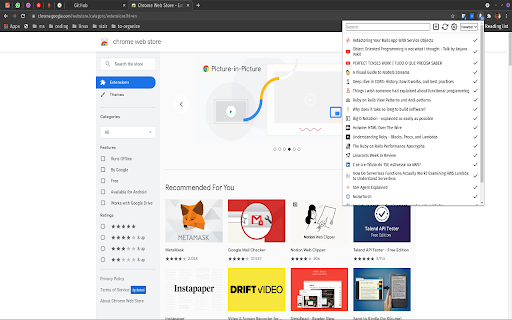
Unnoficial Pocket Client Extension for Google Chrome
Unnoficial Pocket Client Extension for Google Chrome
Trouble with the extension, please contact me at @diegonakamashi or [email protected]
Version: 2.6.4
Release Date: 9-9-2021
- Refresh itens when authenticated
Version: 2.6.3
Release Date: 8-24-2021
- Fix Layout on table items
Version: 2.6.2
Release Date: 8-23-2021
- Fix delete instead of archive options
Version: 2.6.1
Release Date: 8-13-2021
- Fix Layout on table items
Version: 2.6.0
Release Date: 8-12-2021
- Fix Layout on table items
Version: 2.5.0
Release Date: 3-8-2021
- New Layout
- Code refactoring
Version 2.4.5
Release Date: 5-16-2016
-Add a option to switch the archive button to a delete button
Version 2.4.4 (New)
Release Date: 10-09-2015
-Fix Favicon issue
Version 2.4.3
Release Date: 01-22-2015
-Fix Favicon issue
Version 2.4.2
Release Date: 01-21-2014
-Fix Authentication issue
Version 2.4.1
Release Date: 07-30-2013
-Fix Option Page
-Issue 18 - Title is not stored for internal non-public URLs
-Remove Uncount Label Option
Version 2.4
Release Date: 04-22-2012
ChangeLog:
-Faster
-Layout Changes
-Using Font Awesome by Dave Gandy - http://fortawesome.github.com/Font-Awesome
-New Pocket API
-An option to remove the Context Menu was added
-Retriving Favicon with the http://getfavicon.appspot.com/ service
-The sync was improved
Thanks to:
Font Awesome by Dave Gandy
Adonis K - https://github.com/varemenos
Version 2.2.3
Release Date: 07-02-2012
ChangeLog:
-ShortCut Key
-FindBar
-Fix the update
Version 2.2.2 :
Release Date : 22-09-2011
ChangeLog:
-Correct Bugs
--Itens with no titles
Version 2.2 :
Release Date : 03-08-2011
ChangeLog:
-Mark as Read Option in context Menu
-Mark as Read when you click on a link.(Optional)
-Correct Bugs
--chinese and japanese characters
--login problem
Version 2.1.1 :
Release Date : 01-07-2011
ChangeLog:
-Correct Bugs
--some itens are impossible to mark as read
Version 2.1 :
Release Date : 28-06-2011
ChangeLog:
-NEW Design
-Number of unread itens Label in the extension icon
-Now the extension sync when chrome opens for the first time
-Auto-update(120 minutes)
Thanks to http://pc.de/ for the icons:
http://www.iconfinder.com/search/?q=iconset%3Adortmund
Version 2.0 :
Release Date : 15-06-2011
ChangeLog:
-New Design
-Now you can save a link. (Press with the right-button in any link and press I'll readit later)
-Correct Bugs
--logout
--some itens are impossible to mark as read
Version 1.1 :
Release Date : 16-04-2011
ChangeLog:
-There is no pagination anymore
-New popup height
PS: Please give me more suggestions!!
Version 1.0 :
Release Date : 02-04-2011
Thank you for all the suggestion!!!
ChangeLog:
-New Font
-Auto update (30 minutes interval)
-Now you can save a read it later item just clicking in the page with the mouse right button and choosing the "i will read it later" option.
-An option page link
If you found a bug, please let me know!
| 分类 | 📝工作流程与规划 |
| 插件标识 | bbabbdijmipkeilehcnbopedgbjejbmb |
| 平台 | Chrome |
| 评分 |
☆☆☆☆☆
|
| 评分人数 | |
| 插件主页 | https://chromewebstore.google.com/detail/iwillril-unnoficial-pocke/bbabbdijmipkeilehcnbopedgbjejbmb |
| 版本号 | 2.6.9 |
| 大小 | 165KiB |
| 官网下载次数 | 2000 |
| 下载地址 | |
| 更新时间 | 2024-07-16 00:00:00 |
CRX扩展文件安装方法
第1步: 打开Chrome浏览器的扩展程序
第2步:
在地址栏输入: chrome://extensions/
第3步: 开启右上角的【开发者模式】
第4步: 重启Chrome浏览器 (重要操作)
第5步: 重新打开扩展程序管理界面
第6步: 将下载的crx文件直接拖入页面完成安装
注意:请确保使用最新版本的Chrome浏览器