
Slava Russian Dictionary Chrome 插件, crx 扩展下载
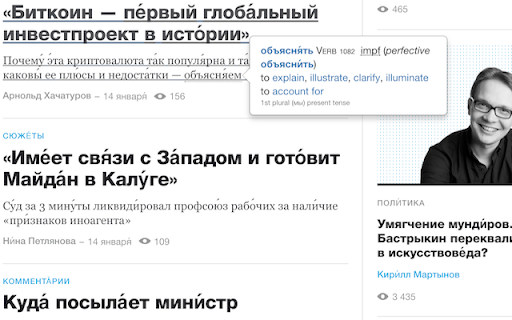
This extension writes accents on Russian words, and adds a popup to each word with its English definition.
Features:
- When visiting a page with Russian text, click the owl icon in the toolbar. This will mark accents (vocal stress position) on Russian words. For example, предложение is converted to предложе́ние.
- After clicking the owl icon, move the mouse over any Russian word to display a pop-up with the English definition of the word.
*) Word base form and accent, e.g. окно́. Click on the Word base to show the full Wiktionary entry with etymology, declension and other information.
*) Word class and grammar, e.g. Noun or Adjective, neutral, inanimate
*) Key grammatical forms, e.g. neutral inanimate
*) For verbs, perfective or imperfective and the corresponding other form(s), e.g. пить impf (perfective вы́пить or попи́ть)
*) Definition and example sentences
Notes:
- The extension must be manually activated for every tab where you want it to run. For this, click on the button with the owl icon in the toolbar.
- In some cases, there are multiple possibilities for accenting the word. For example, окна can be окна́ (genitive singular) or о́кна (nominative/accusative plural). The extension does not attempt to guess the correct case, so it will mark the word о́кна́. The reader should of course not accent both vowels, but infer the correct pronunciation from the context.
This is a non-commercial, open-source project. There are no ads or hidden features.
Privacy policy: the extension does not record not sends any information to external servers. When a pop-up is displayed, the Wiktionary public API is called to retrieve the word definition to be displayed.
| 分类 | 📝工作流程与规划 |
| 插件标识 | bcbcmhmpbggnljoapclfcagammaapghi |
| 平台 | Chrome |
| 评分 |
☆☆☆☆☆
|
| 评分人数 | |
| 插件主页 | https://chromewebstore.google.com/detail/slava-russian-dictionary/bcbcmhmpbggnljoapclfcagammaapghi |
| 版本号 | 0.0.0.4 |
| 大小 | 3.81MiB |
| 官网下载次数 | 952 |
| 下载地址 | |
| 更新时间 | 2019-05-28 00:00:00 |
CRX扩展文件安装方法
第1步: 打开Chrome浏览器的扩展程序
第2步:
在地址栏输入: chrome://extensions/
第3步: 开启右上角的【开发者模式】
第4步: 重启Chrome浏览器 (重要操作)
第5步: 重新打开扩展程序管理界面
第6步: 将下载的crx文件直接拖入页面完成安装
注意:请确保使用最新版本的Chrome浏览器