
Show Me The Recipe! Chrome 插件, crx 扩展下载
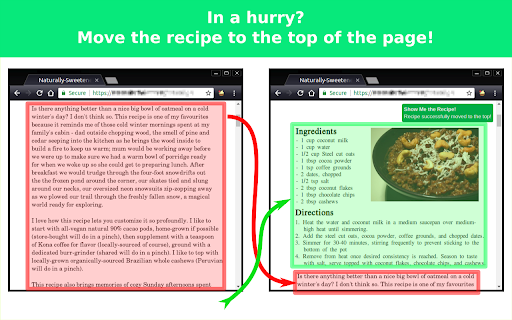
Skip the life story on recipe blogs and get what you came for - the recipe!
The 'Adblock' for recipe blogs! When you just need to know how many eggs, but don't want to read about the divorce.
This extension finds the actual recipe on many* popular recipe blogs, and brings it to the top of the page - no more scrolling to the bottom to get what you came for.
Think the author's blog post should take precedence over the recipe? Don't install this extension.
SUPPORT:
Recipe isn't above the blog as promised? Something else went wrong? Contact the support email below and we'll fix it ASAP
* Please note: We are working on getting as many to work as possible, but some sites can't be affected for technical reasons. Let us know and we'll do our best!
| 分类 | 📝工作流程与规划 |
| 插件标识 | bchinpknmmmhblibnjgckcbicajcddni |
| 平台 | Chrome |
| 评分 |
☆☆☆☆☆
|
| 评分人数 | |
| 插件主页 | https://chromewebstore.google.com/detail/show-me-the-recipe/bchinpknmmmhblibnjgckcbicajcddni |
| 版本号 | 25.2.3.0 |
| 大小 | 27.18KiB |
| 官网下载次数 | 136 |
| 下载地址 | |
| 更新时间 | 2022-09-28 00:00:00 |
CRX扩展文件安装方法
第1步: 打开Chrome浏览器的扩展程序
第2步:
在地址栏输入: chrome://extensions/
第3步: 开启右上角的【开发者模式】
第4步: 重启Chrome浏览器 (重要操作)
第5步: 重新打开扩展程序管理界面
第6步: 将下载的crx文件直接拖入页面完成安装
注意:请确保使用最新版本的Chrome浏览器