
PageExplorer Chrome 插件, crx 扩展下载
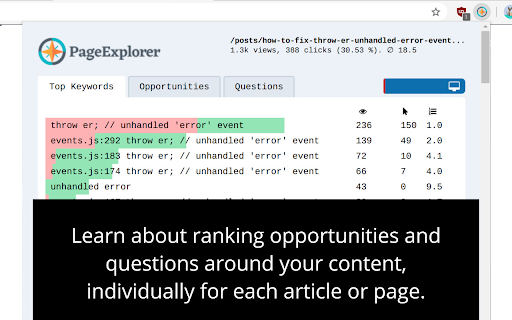
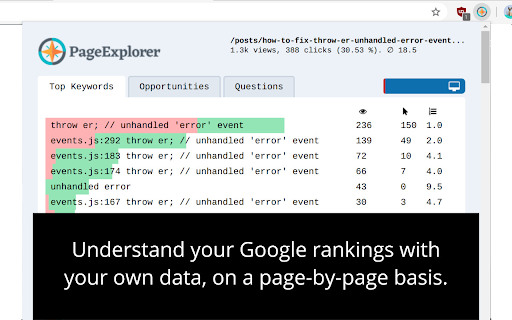
PageExplorer helps you to optimize your website's SEO potential, page by page.
PageExplorer is your custom keyword research tool and content optimization tool - living right in your browser!
It allows you to work directly with your *own* Google Search Console data. This way, you analyze only relevant and closely-related keywords, getting actual keyword volumes and difficulties, by default.
The PageExplorer browser extension helps you identify ranking opportunities, new questions and underutilized long tail keywords at a glance.
Armed with this knowledge, you can optimize your
- titles,
- meta-tags,
- headings (H1, H2, H3, etc.) and
- of course your content itself.
It allows you to rank higher and drive more traffic to your website.
How does it work?
-----------------
Once you’ve connected PageExplorer to your Google Search Console, it allows you to inspect each individual page on your website for
- keywords it ranks for,
- potential opportunities to increase your CTR and rank higher as well as
- commonly asked questions (FAQ).
The images above help to visualize how it exactly works. With these insights, you are able to improve your ranking step by step. Naturally, this works especially well for long tail seo rankings.
Who is it for?
--------------
The PageExplorer extension works for both experienced as well as novice users. Basic understanding of SEO fundamentals helps a great deal, but this can also be acquired along the way. The extension offers tool-tips explaining abbreviations (see YouTube video).
If you are experienced in working with tools such as Ahrefs, Majestic, Moz or SEMrush, you will be able to start right off and get the most value from it. Thanks to the URL-based approach, you can find SEO insights which would get lost in the mass of data shown in the Google Search Console application.
About PageExplorer
-----------------
A few words about my background. I'm Peter Thaleikis, a software engineer and maker who loves to build and optimize. SEO has become one of my favorite topics over the last few years. My technical background helps me a lot in this area and I hope to share the positives from it with others here.
I hope this is useful for you and your project. If you have questions or comments, feel free to reach out on peterthaleikis.com/contact!
| 分类 | 📝工作流程与规划 |
| 插件标识 | bddlccnclehmmpgmkhboflgpanfijicj |
| 平台 | Chrome |
| 评分 |
☆☆☆☆☆
|
| 评分人数 | |
| 插件主页 | https://chromewebstore.google.com/detail/pageexplorer/bddlccnclehmmpgmkhboflgpanfijicj |
| 版本号 | 2.2.4 |
| 大小 | 172KiB |
| 官网下载次数 | 34 |
| 下载地址 | |
| 更新时间 | 2020-12-27 00:00:00 |
CRX扩展文件安装方法
第1步: 打开Chrome浏览器的扩展程序
第2步:
在地址栏输入: chrome://extensions/
第3步: 开启右上角的【开发者模式】
第4步: 重启Chrome浏览器 (重要操作)
第5步: 重新打开扩展程序管理界面
第6步: 将下载的crx文件直接拖入页面完成安装
注意:请确保使用最新版本的Chrome浏览器