
Robinhood Reports Chrome 插件, crx 扩展下载
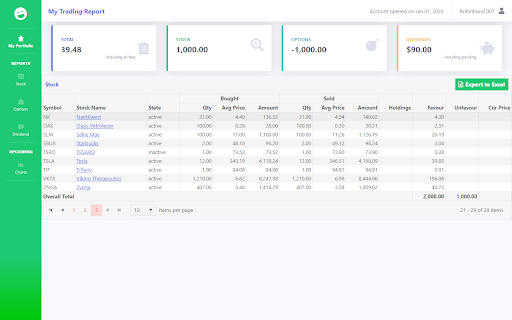
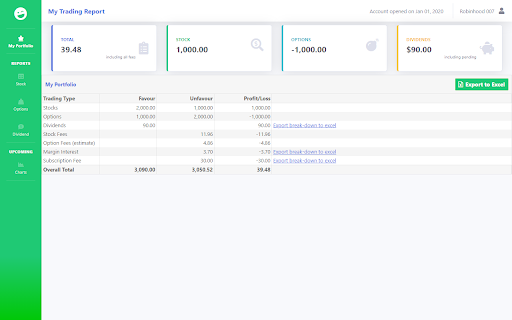
Displays summary of Robinhood trades.
This report shows profit and loss of each stock you traded.
It includes Stocks, Options, Dividends, Stock/Option Fee, Margin Interest and Subscription Fee.
Rest all transactions are NOT covered.
Important : This extension stores all your trading information in your local system. Avoid using it on public systems.
Note: This report can be updated only on non-trading hours or weekends. For ex: 8:00AM to 3:00PM CST cannot be updated.
* The numbers may not match with Robinhood numbers due to variety of reasons like decimal places, fees, adjustments etc.,.
Chrome Version must be greater than v80. Doesn't work on lower versions.
Not tested on MAC and any other non-desktop devices.
This extension is not affiliated, associated, authorized, endorsed by, or in any way officially connected with the Robinhood Markets, or any of its subsidiaries or its affiliates.
All product and company names are trademarks™ or registered® trademarks of their respective holders. Use of them does not imply any affiliation with or endorsement by them.
| 分类 | 📝工作流程与规划 |
| 插件标识 | bdfejgnkjilbfajogjdjoelflfjjlbce |
| 平台 | Chrome |
| 评分 |
☆☆☆☆☆
|
| 评分人数 | |
| 插件主页 | https://chromewebstore.google.com/detail/robinhood-reports/bdfejgnkjilbfajogjdjoelflfjjlbce |
| 版本号 | 25.2.3.0 |
| 大小 | 2.85MiB |
| 官网下载次数 | 2000 |
| 下载地址 | |
| 更新时间 | 2021-02-16 00:00:00 |
CRX扩展文件安装方法
第1步: 打开Chrome浏览器的扩展程序
第2步:
在地址栏输入: chrome://extensions/
第3步: 开启右上角的【开发者模式】
第4步: 重启Chrome浏览器 (重要操作)
第5步: 重新打开扩展程序管理界面
第6步: 将下载的crx文件直接拖入页面完成安装
注意:请确保使用最新版本的Chrome浏览器