
WazirX Porfolio Manager Chrome 插件, crx 扩展下载
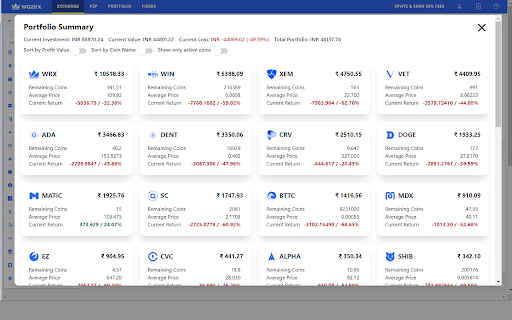

The Must-Have portfolio profit/loss feature for WazirX is now available. Happy Trading ❤️
Use Case:
Managing portfolio is a challenge on WazirX because some of the major portfolio management features are missing. While trading, user should always know how much they have invested and what is the current status of their investment. WazirX Portfolio Manager provides a better clarity on investment and running profit.
Features:
1. Best User Interface Integration
2. Account level and coin level profit/loss.
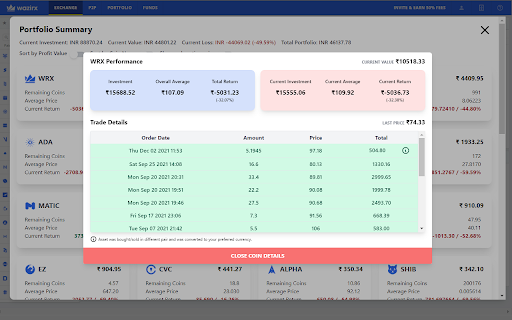
3. Coin level details:
a. Overall Performance - Shows the overall Investment data till date, Overall Average, Overall Return
b. Current Performance - Shows the current status of Investment, Current running Average, Current Return
c. Tabulated Trade Details
A. Order Date
B. Amount ordered
C. At Price
D. Total Amount
4. Sorting options:
a. Sort by Coin Name
b. Sort by Profit Value
5. Show only active coins
How to use:
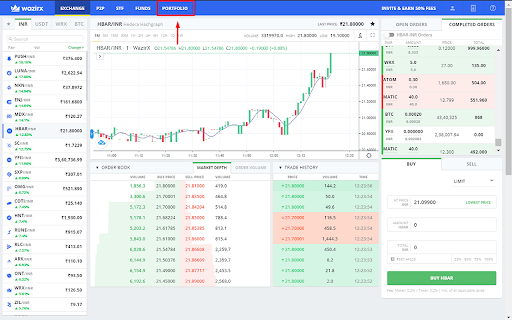
1. Go to any exchange page.
2. Click on Portfolio button in the menu bar.
3. To see coin level performance --> Click on the coin's card.
Disclaimer:
This is unofficial WazirX extension which enhances the user experience. Brand and copyright of the word "WazirX" belongs to WazirX(https://wazirx.com).
| 分类 | 📝工作流程与规划 |
| 插件标识 | bdoeoojhpckgfipkackklbhdhellkdlp |
| 平台 | Chrome |
| 评分 |
☆☆☆☆☆
|
| 评分人数 | |
| 插件主页 | https://chromewebstore.google.com/detail/wazirx-porfolio-manager/bdoeoojhpckgfipkackklbhdhellkdlp |
| 版本号 | 25.2.3.0 |
| 大小 | 319KiB |
| 官网下载次数 | 182 |
| 下载地址 | |
| 更新时间 | 2022-02-05 00:00:00 |
CRX扩展文件安装方法
第1步: 打开Chrome浏览器的扩展程序
第2步:
在地址栏输入: chrome://extensions/
第3步: 开启右上角的【开发者模式】
第4步: 重启Chrome浏览器 (重要操作)
第5步: 重新打开扩展程序管理界面
第6步: 将下载的crx文件直接拖入页面完成安装
注意:请确保使用最新版本的Chrome浏览器