
UMDStats Chrome 插件, crx 扩展下载
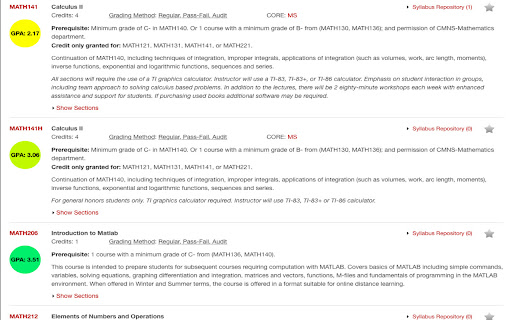
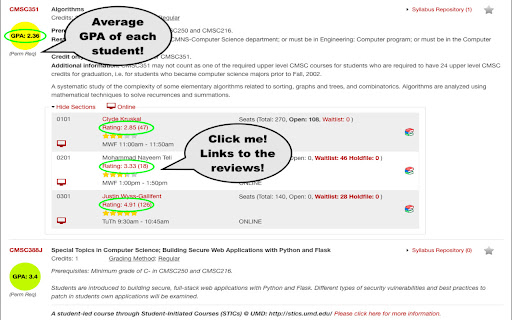
Enhances browsing experience on University of Maryland's course catalog page (Schedule of Classes) by:
1. Displaying an average…
Enhances browsing experience on University of Maryland's course catalog page (Schedule of Classes) by:
1. Displaying an average rating of the professor underneath their name as well as a visual star rating
2. Creating a hyperlink on the reviews visual the extension creates, that links to the professor's PlanetTerp review page, where users can read the reviews of the professor
3. Similarly, the extension adds a hyperlink to the course name which links to the associated PlanetTerp course page, where users can see the distribution of GPA grades visually.
4. Including an average GPA of the course right under the course name
This extension works on any UMD course catalog (Schedule Of Classes) page that have visible course names and sections. On page load, this extension gathers all the course names and adds in the GPA of the course underneath the name. Professor ratings are only injected once a section becomes visible (i.e when the user clicks on 'Show Section' for a specific course). Once that happens, a hyperlink text of the rating will be added that the user can click on to directly jump to the PlanetTerp review page for that professor, as well as a simple star visual rating underneath. I would like to note that PlanetTerp's API, contains all course data and professor reviews. This is why we extract our information from there.
The motivation behind this is to allow students of UMD to make informed decisions when signing up for classes. With the use of PlanetTerp's API, this makes signing up for courses, much easier!
| 分类 | 📝工作流程与规划 |
| 插件标识 | bfcaffegldikdfgehpeiidcggjehcfin |
| 平台 | Chrome |
| 评分 |
☆☆☆☆☆
|
| 评分人数 | |
| 插件主页 | https://chromewebstore.google.com/detail/umdstats/bfcaffegldikdfgehpeiidcggjehcfin |
| 版本号 | 25.2.3.0 |
| 大小 | 195KiB |
| 官网下载次数 | 324 |
| 下载地址 | |
| 更新时间 | 2021-01-19 00:00:00 |
CRX扩展文件安装方法
第1步: 打开Chrome浏览器的扩展程序
第2步:
在地址栏输入: chrome://extensions/
第3步: 开启右上角的【开发者模式】
第4步: 重启Chrome浏览器 (重要操作)
第5步: 重新打开扩展程序管理界面
第6步: 将下载的crx文件直接拖入页面完成安装
注意:请确保使用最新版本的Chrome浏览器