
Password Generator Chrome 插件, crx 扩展下载
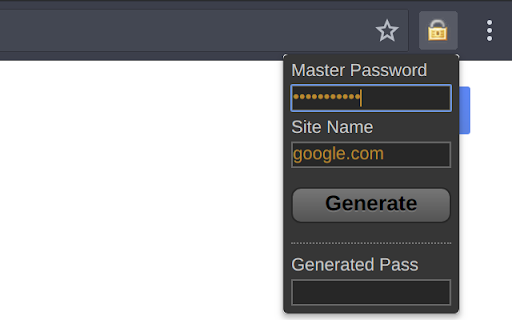
Generates strong, recoverable SHA1 password hashes from a master password
Remember a single password to generate repeatable, secure passwords for multiple sites.
Chrome implementation of Nic Wolff's SHA1 password generator ( http://angel.net/~nic/passwd.sha1.1a.html ).
All actual hashing code taken directly from link above.
Extension adds a 'save' button to store the master password (optionally), and will try to pre-fill the site name with the current site's root domain name.
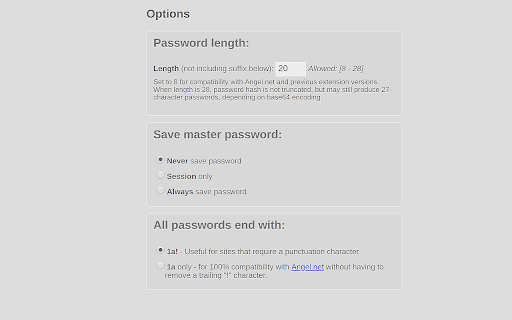
Last three characters of password will always be "1a!" for sites that require a combination of letters, numbers and/or punctuation.
(new) Optionally, they can be set to "1a" for compatibility with angel.net.
*CHANGELOG*
Version 0.2.0 (03-20-2018)
+ Adding option for longer (up to 27/28 character passwords, before adding extra characters).
+ Recognize .io domains when stripping subdomains
+ Upgrade manifest version to support chrome 67
Version 0.1.3.6 (04-21-2010)
+Fixed options page settings not being saved
Version 0.1.3.5 (03-11-2010)
+Adding options page and session storage option
+Removed 'save' checkbox from popup
+Added compatibility option with angel .net (passwords end in '1a!' vs '1a')
+Improved domain name parser
+Better button style
Version 0.1.3.2 (12-12-2009)
+Added default_title
Version 0.1.3.1 (08-12-2009)
+Rounding popup corners
Version 0.1.3.0 (29-11-2009)
+Automatically copy generated password to clipboard
| 分类 | 📝工作流程与规划 |
| 插件标识 | bhhinkiejikaoegbkfghkchkfekbkbic |
| 平台 | Chrome |
| 评分 |
☆☆☆☆☆
|
| 评分人数 | |
| 插件主页 | https://chromewebstore.google.com/detail/password-generator/bhhinkiejikaoegbkfghkchkfekbkbic |
| 版本号 | 5.0.1 |
| 大小 | 23.53KiB |
| 官网下载次数 | 310 |
| 下载地址 | |
| 更新时间 | 2024-10-06 00:00:00 |
CRX扩展文件安装方法
第1步: 打开Chrome浏览器的扩展程序
第2步:
在地址栏输入: chrome://extensions/
第3步: 开启右上角的【开发者模式】
第4步: 重启Chrome浏览器 (重要操作)
第5步: 重新打开扩展程序管理界面
第6步: 将下载的crx文件直接拖入页面完成安装
注意:请确保使用最新版本的Chrome浏览器