
Chrome tabs switcher Chrome 插件, crx 扩展下载

Chrome extension for easy switching between tabs
Chrome extension for easy switching between tabs.
Features:
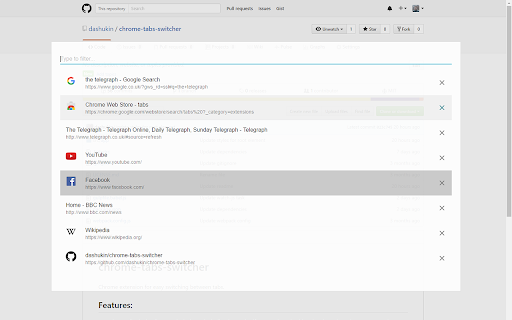
- Shows all tabs in all opened windows (including incognito if appropriate checkbox is selected on chrome://extensions page).
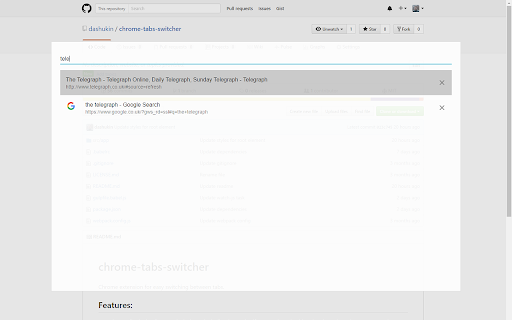
- Allows to filter tabs list with help of text entered in search field.
- Each tab item listed in application includes page title, url and favicon (except cases when current page is loaded via https, but favicon is hosted via http - to prevent mixed content on the page.)
- Allows to close any of listed tabs from the application.
- Allows to navigate between listed tabs via ArrowDown/ArrowUp, Tab/Shift+Tab keys.
Usage:
- Install via chrome web store
- Refresh page to ensure extension script has been loaded
- Use key combination Ctrl + B (will be improved in further versions) to open application
- Apply filter if necessary
- Choose tab you want to switch to and click on it
- Click on the cross icon to close desired tab.
Roadmap:
- Add keyboard support for tabs closing functionality
- Improve keyboard interactions inside application
- Add dynamic configuration for application appearance and functionality
| 分类 | ♿无障碍访问 |
| 插件标识 | blnlokddecelmlhfpnmeekjcfdfapmjl |
| 平台 | Chrome |
| 评分 |
☆☆☆☆☆
|
| 评分人数 | |
| 插件主页 | https://chromewebstore.google.com/detail/chrome-tabs-switcher/blnlokddecelmlhfpnmeekjcfdfapmjl |
| 版本号 | 2.1 |
| 大小 | 126KiB |
| 官网下载次数 | 181 |
| 下载地址 | |
| 更新时间 | 2017-02-18 00:00:00 |
CRX扩展文件安装方法
第1步: 打开Chrome浏览器的扩展程序
第2步:
在地址栏输入: chrome://extensions/
第3步: 开启右上角的【开发者模式】
第4步: 重启Chrome浏览器 (重要操作)
第5步: 重新打开扩展程序管理界面
第6步: 将下载的crx文件直接拖入页面完成安装
注意:请确保使用最新版本的Chrome浏览器