
Style Adjuster Chrome 插件, crx 扩展下载
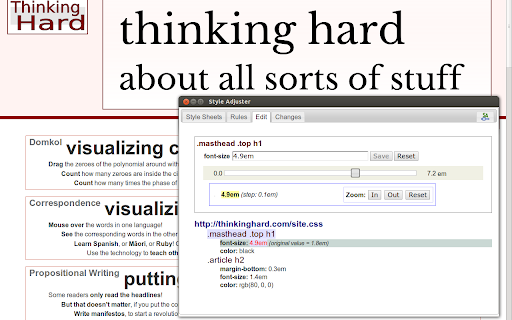
Adjust your CSS styles, without taking your eyes off the result.
What makes Style Adjuster great is that you can adjust numerical CSS property values using a slider, without having to take your eyes off the changes happening in the target page. This reduces cognitive load, and lets you concentrate on the aesthetics of the changed values, which is what matters.
Click the extension icon to bring up the Style Adjuster dialog. The dialog shows you all CSS styles in the current (target) tab. Choose which CSS properties you wish to "adjust". In the "Edit" tab, select the property to edit. Edit the property. Text-editing is always available, but other editor UI is available for common property types, such as dimensions, positions and colors. See your changes made in the target page. Go to the "Changes" tab to see any changes you have made in CSS format. Select and copy the changes and paste them back into your source code.
Rinse and repeat.
| 分类 | 💻开发者工具 |
| 插件标识 | bmnmiidhocohelghddfcfbhojknfclba |
| 平台 | Chrome |
| 评分 |
☆☆☆☆☆
|
| 评分人数 | |
| 插件主页 | https://chromewebstore.google.com/detail/style-adjuster/bmnmiidhocohelghddfcfbhojknfclba |
| 版本号 | 0.5.6 |
| 大小 | 265KiB |
| 官网下载次数 | 148 |
| 下载地址 | |
| 更新时间 | 2013-08-22 00:00:00 |
CRX扩展文件安装方法
第1步: 打开Chrome浏览器的扩展程序
第2步:
在地址栏输入: chrome://extensions/
第3步: 开启右上角的【开发者模式】
第4步: 重启Chrome浏览器 (重要操作)
第5步: 重新打开扩展程序管理界面
第6步: 将下载的crx文件直接拖入页面完成安装
注意:请确保使用最新版本的Chrome浏览器