
Auto-Convert CSV to XLSX Chrome 插件, crx 扩展下载
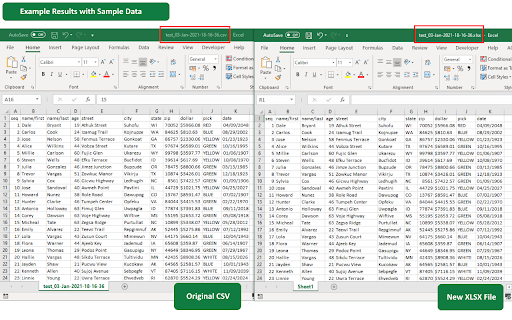
Auto-Converts downloaded CSV files to XLSX
** Summary **
v1.0 comes with the following features:
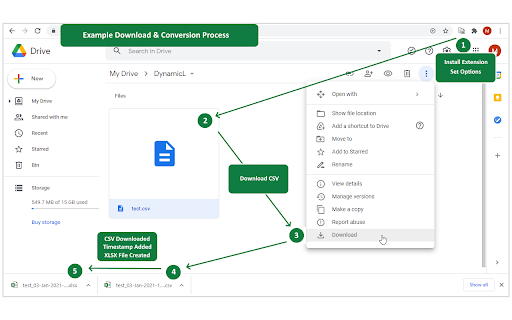
* Easy to get started, simply install via the Chrome Extension library, ENABLE 'Allow access to file URLS’ via 'Manage Extensions' and its ready to go
* All the code and data runs client side in the browser and remains there so your data never leaves your computer
* Reliable, accurate and fast CSV conversion
* Customisable Options
-- Domain White List (blank by default). For all domains, leave blank. For multiple domains, use comma separated list of domain names, examples below:
-- google.com
-- google.com,microsoft.com,github.com
- Delete CSV after converting to Excel XLSX (disabled by default)
- Append Timestamp to Filename (enabled by default)
** Credits **
Papa Parse - https://github.com/mholt/PapaParse
zipcelx - https://github.com/egeriis/zipcelx
** Contributing **
To discuss a new feature or ask a question, please open an issue or contact me directly - [email protected]
| 分类 | 📝工作流程与规划 |
| 插件标识 | bpcbpnlhalnkaheioffegmhhdlmooieg |
| 平台 | Chrome |
| 评分 |
☆☆☆☆☆
|
| 评分人数 | |
| 插件主页 | https://chromewebstore.google.com/detail/auto-convert-csv-to-xlsx/bpcbpnlhalnkaheioffegmhhdlmooieg |
| 版本号 | 1.2.1 |
| 大小 | 80.5KiB |
| 官网下载次数 | 924 |
| 下载地址 | |
| 更新时间 | 2021-01-11 00:00:00 |
CRX扩展文件安装方法
第1步: 打开Chrome浏览器的扩展程序
第2步:
在地址栏输入: chrome://extensions/
第3步: 开启右上角的【开发者模式】
第4步: 重启Chrome浏览器 (重要操作)
第5步: 重新打开扩展程序管理界面
第6步: 将下载的crx文件直接拖入页面完成安装
注意:请确保使用最新版本的Chrome浏览器