
Untrusted Types for DevTools Chrome 插件, crx 扩展下载
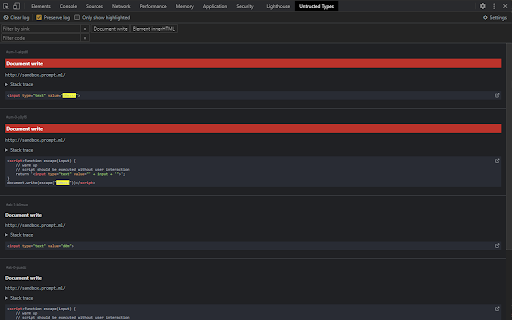
Abusing Trusted Types to discover XSS sinks.
Discover and test inputs passed into sinks that could lead to DOM XSS vulnerabilities.
A sink is a code pattern that could run arbitrary JavaScript code if the input is malicious, for example: innerHTML, eval, document.write.
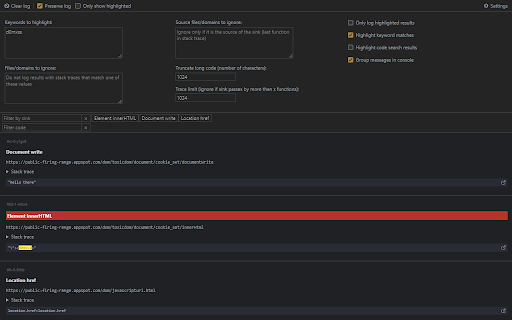
This extension adds a panel to DevTools where you can see/filter the sink logs and customize settings.
Keywords (by default: "d0mxss") that are found to be passed in a sink will be highlighted in the extension and in console.
You can then find the stack trace of a specific log:
1. Click to copy the ID,
2. Open Console>Filter and paste the ID,
3. Now you can inspect the stack trace. Click on the function name to open it in the Sources tab.
| 分类 | 💻开发者工具 |
| 插件标识 | bpeblffgmddnafmnmdjohcmkbeifdlnb |
| 平台 | Chrome |
| 评分 |
☆☆☆☆☆
|
| 评分人数 | |
| 插件主页 | https://chromewebstore.google.com/detail/untrusted-types-for-devto/bpeblffgmddnafmnmdjohcmkbeifdlnb |
| 版本号 | 8.3 |
| 大小 | 39.16KiB |
| 官网下载次数 | 1000 |
| 下载地址 | |
| 更新时间 | 2021-10-13 00:00:00 |
CRX扩展文件安装方法
第1步: 打开Chrome浏览器的扩展程序
第2步:
在地址栏输入: chrome://extensions/
第3步: 开启右上角的【开发者模式】
第4步: 重启Chrome浏览器 (重要操作)
第5步: 重新打开扩展程序管理界面
第6步: 将下载的crx文件直接拖入页面完成安装
注意:请确保使用最新版本的Chrome浏览器