
github.expandinizr Chrome 插件, crx 扩展下载

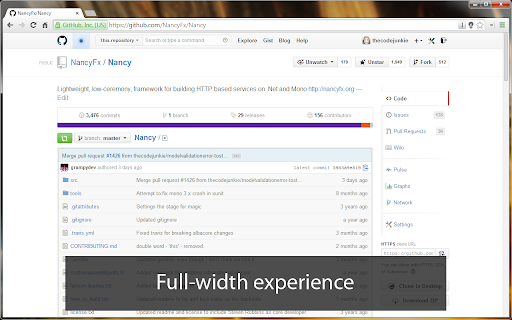

Chrome extension that improves the GitHub experience
Currently enhances the following:
- Removes the truncating of file and directory names in the repository browser
- Really long file and directory names will word-wrap
- Fully expands the website, with breakpoints at 1400px, 1600px and 1800px, 2000px
- Removes truncation in notifications
- Adds shrink/expand button for comment form
- Adds possibility to collapse code previews
- GitHub Enterprise support!
Author
- Andreas Håkansson, Kristian Hellang
Contributors
- Bjarki Heiðar Ingason
- Christopher Campanale
- Frank Radocaj
- Phillip Haydon
- Benjamin Chris
Changelog
- v2.0.2 - Support GitHubs new UI + XXL mode (2000px)
- v2.0.1 - Fixed race condition
- v2.0.0 - Various improvements
- v1.8.0
- Fixed a bug where file names were not expanded
- Added support for GitHub Enterprise!
- v1.7.2 - Bugfixes
- v1.7.1 - Removed ugly `aria-label`s
- v1.7.0
- Removed truncation in notifications
- Fixed commit comment width
- Fixed collapse code file button
- Added shrink/expand button for comment form
- v1.6.0 - Rewrote css, fixed layout bugs, expanded gists, converted to LESS
- v1.5.1 - Removed side-bar expansion, it broke too much stuff
- v1.5.0 - Added possibility to collaps code previews
- v1.4.0 - Expands side-bar for 1400, 1600 and 1800 break points
- v1.3.2 - Improved expanding of activity stream
- v1.3.1 - Fixed a couple of small layout bugs
- v1.3.0 - Changed to a responsive approach
- v1.2.0 - Improved the un-truncting to word-wrap (thanks Frank Radocaj)
- v1.1.1 - Fix for labels on the expanded issue form
- v1.1.0 - Expands the issue form to full width (thanks Phillip Haydon)
- v1.0.0 - First release of the extension
| 分类 | 💻开发者工具 |
| 插件标识 | cbehdjjcilgnejbpnjhobkiiggkedfib |
| 平台 | Chrome |
| 评分 |
☆☆☆☆☆
|
| 评分人数 | |
| 插件主页 | https://chromewebstore.google.com/detail/githubexpandinizr/cbehdjjcilgnejbpnjhobkiiggkedfib |
| 版本号 | 116 |
| 大小 | 68.69KiB |
| 官网下载次数 | 1000 |
| 下载地址 | |
| 更新时间 | 2020-07-24 00:00:00 |
CRX扩展文件安装方法
第1步: 打开Chrome浏览器的扩展程序
第2步:
在地址栏输入: chrome://extensions/
第3步: 开启右上角的【开发者模式】
第4步: 重启Chrome浏览器 (重要操作)
第5步: 重新打开扩展程序管理界面
第6步: 将下载的crx文件直接拖入页面完成安装
注意:请确保使用最新版本的Chrome浏览器