
Get Netflix Trailers Chrome 插件, crx 扩展下载
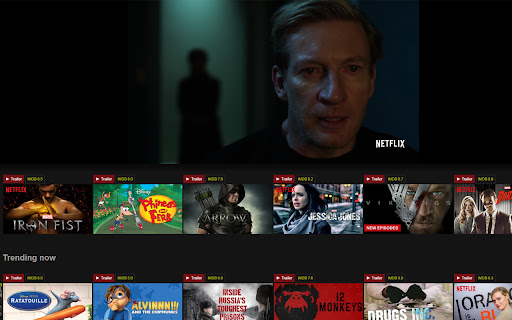
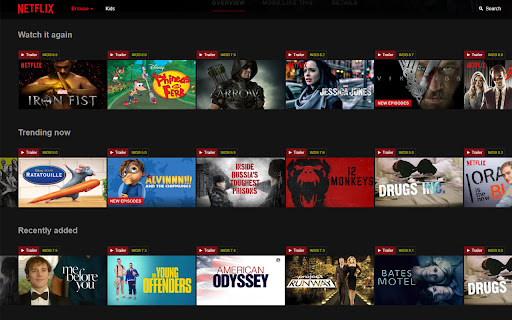
Netflix trailers, just got so much easier. Just click on the link added above the movie.
The easiest and most convenient way to see Movie Trailers and IMDB ratings while browsing on Netflix. With this chrome extension it makes it so much easier, no copy paste or typing it out. You don't even have to leave the page. Just simply click the red 'play trailer' button added above the movie or tv-show you're interested in. The top half of the screen will display trailer, letting continue to browse while the trailer plays.
-- Updates made to fix the extension due to Netflix updates.
-- Updated rating API.
| 分类 | 🛠️工具 |
| 插件标识 | ccnidblbfndpbnceipcgihpfpolpkfkc |
| 平台 | Chrome |
| 评分 |
☆☆☆☆☆
|
| 评分人数 | |
| 插件主页 | https://chromewebstore.google.com/detail/get-netflix-trailers/ccnidblbfndpbnceipcgihpfpolpkfkc |
| 版本号 | 1.0.0.47 |
| 大小 | 39.16KiB |
| 官网下载次数 | 224 |
| 下载地址 | |
| 更新时间 | 2018-08-01 00:00:00 |
CRX扩展文件安装方法
第1步: 打开Chrome浏览器的扩展程序
第2步:
在地址栏输入: chrome://extensions/
第3步: 开启右上角的【开发者模式】
第4步: 重启Chrome浏览器 (重要操作)
第5步: 重新打开扩展程序管理界面
第6步: 将下载的crx文件直接拖入页面完成安装
注意:请确保使用最新版本的Chrome浏览器