
Tab Aligner Chrome 插件, crx 扩展下载
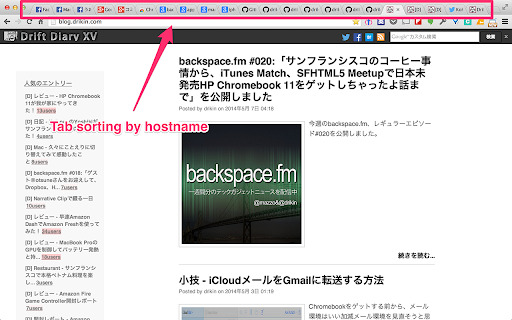
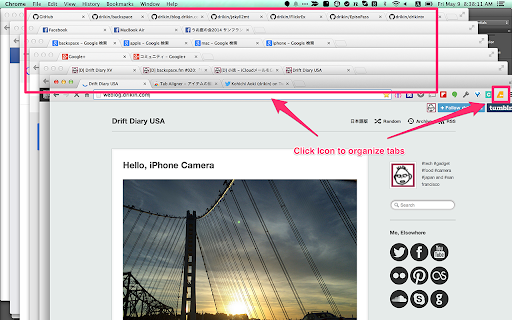
Simple and powerful Tab organizing extension
Have you noticed you opened multiple tabs for the same page before?
Tab Aligner addresses the pain point with the following three features.
1. Tab sorting by hostname in the same window
2. Duplicate tab merging which has exactly the same url
3. Organize all tabs into multiple windows by hostname (by clicking Tab Aligner icon)
It's powered by Dart which provides more performance!
Release Note
-----------
0.0.7: Revert 0.0.6 introduced automatic reload feature made some troubles. optimize performance
0.0.6: When duplicate tab is detected, not only switching existing tab but also forcibly reload the tab
0.0.5: Restore Pinned state after grouping tabs
0.0.4: Bug fix
0.0.3: Initial public release version
| 分类 | 📝工作流程与规划 |
| 插件标识 | cegjnbajkdmaijhcimmajappmimkohhe |
| 平台 | Chrome |
| 评分 |
☆☆☆☆☆
|
| 评分人数 | |
| 插件主页 | https://chromewebstore.google.com/detail/tab-aligner/cegjnbajkdmaijhcimmajappmimkohhe |
| 版本号 | 3.1.1 |
| 大小 | 144KiB |
| 官网下载次数 | 907 |
| 下载地址 | |
| 更新时间 | 2017-06-10 00:00:00 |
CRX扩展文件安装方法
第1步: 打开Chrome浏览器的扩展程序
第2步:
在地址栏输入: chrome://extensions/
第3步: 开启右上角的【开发者模式】
第4步: 重启Chrome浏览器 (重要操作)
第5步: 重新打开扩展程序管理界面
第6步: 将下载的crx文件直接拖入页面完成安装
注意:请确保使用最新版本的Chrome浏览器