
WME-JunctionAngle Chrome 插件, crx 扩展下载
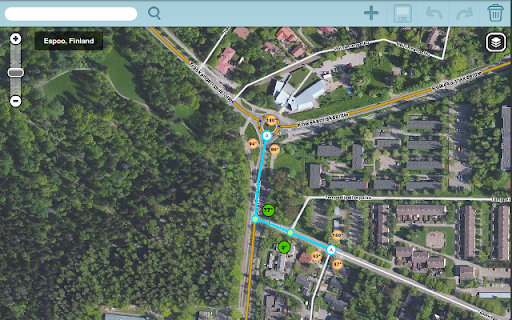
This extension adds junction angle information to the the Waze map editor.
Waze Map Editor (WME) addon to help with junction design. If two connected segments are selected, it shows the turn angle, otherwise the the angle between each segment. This is the same thing as the UserScript (https://greasyfork.org/en/scripts/7887-wme-junction-angle-info), but packaged to work with Chromium and Google Chrome. Problems and fixes should be reported on GitHub https://github.com/milkboy/WME-ja/issues
Recent changes:
1.13.1 - Update for new WME and URL
1.12.0 - Add option for hiding/displaying the JAI layer on page load
1.11.0 - Bootstrapping fixes. U-turn tweaks.
1.10.0 - Small changes in the Waze instruction logic, support for U-turns and lots of small fixes
| 分类 | 📝工作流程与规划 |
| 插件标识 | cfcpfikgmfoghjfpfepmklballeagadf |
| 平台 | Chrome |
| 评分 |
☆☆☆☆☆
|
| 评分人数 | |
| 插件主页 | https://chromewebstore.google.com/detail/wme-junctionangle/cfcpfikgmfoghjfpfepmklballeagadf |
| 版本号 | 25.2.3.0 |
| 大小 | 71.49KiB |
| 官网下载次数 | 1000 |
| 下载地址 | |
| 更新时间 | 2017-08-21 00:00:00 |
CRX扩展文件安装方法
第1步: 打开Chrome浏览器的扩展程序
第2步:
在地址栏输入: chrome://extensions/
第3步: 开启右上角的【开发者模式】
第4步: 重启Chrome浏览器 (重要操作)
第5步: 重新打开扩展程序管理界面
第6步: 将下载的crx文件直接拖入页面完成安装
注意:请确保使用最新版本的Chrome浏览器