
ShiftApp: Extra features for WhatsApp Chrome 插件, crx 扩展下载

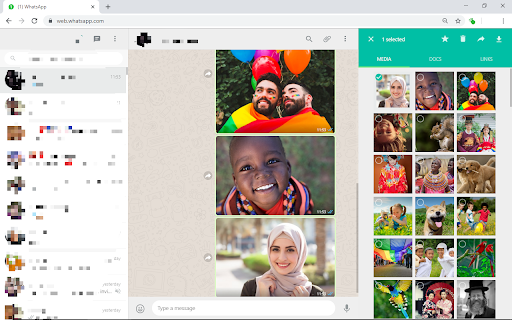
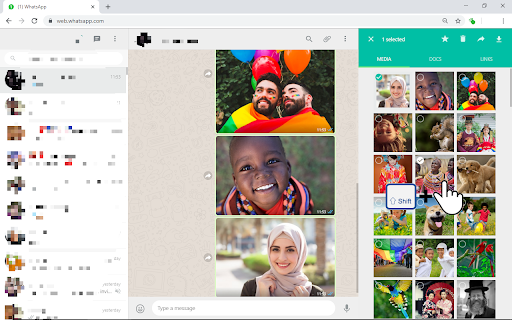
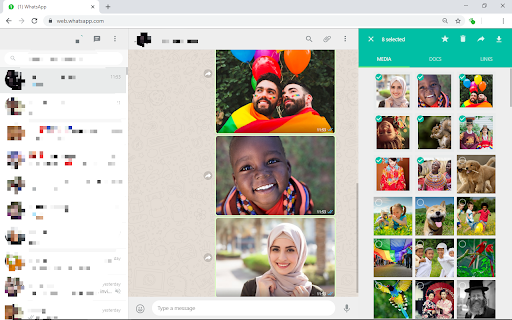
Check multiple WhatsApp images with shift-click
Tired of checking images one by one?
This extension helps you check a range of images in WhatsApp Web using shift-click (OS like) instead of checking the images one by one.
How to use?
- Check at least two images before using the range-selection with shift-click.
- Except for the first image, the images must be selected by clicking on the image itself and not the check mark in the top left corner.
________________________________
I was tired of checking images one by one in order to download multiple images, and noticed that range-selection feature is missing from the official Whatsapp Web, so I decided to develop this extension and to learn some JavaScript.
If you find any problems please contact me at [email protected]. In addition, I would love to receive feedback or suggestions for improvement.
| 分类 | 👥社交 |
| 插件标识 | cfkoohflgmbenjednimmnkngaiofeapf |
| 平台 | Chrome |
| 评分 |
☆☆☆☆☆
|
| 评分人数 | |
| 插件主页 | https://chromewebstore.google.com/detail/shiftapp-extra-features-f/cfkoohflgmbenjednimmnkngaiofeapf |
| 版本号 | 3.128.4 |
| 大小 | 18.73KiB |
| 官网下载次数 | 229 |
| 下载地址 | |
| 更新时间 | 2019-08-20 00:00:00 |
CRX扩展文件安装方法
第1步: 打开Chrome浏览器的扩展程序
第2步:
在地址栏输入: chrome://extensions/
第3步: 开启右上角的【开发者模式】
第4步: 重启Chrome浏览器 (重要操作)
第5步: 重新打开扩展程序管理界面
第6步: 将下载的crx文件直接拖入页面完成安装
注意:请确保使用最新版本的Chrome浏览器