
Robinhood History Downloader & Analyzer Chrome 插件, crx 扩展下载

Easiest way to download and analyze your robinhood transactions
** UPDATED on Aug 2023 ** It should now work on Crypto, Options, and Stocks
Use this extension to download your trade history on Robinhood!
Instructions:
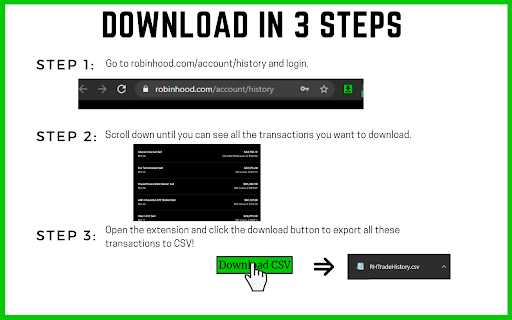
- Go to robinhood.com/account/history and login.
- Scroll down until you see all the transactions you want to download.
- Click the extension icon to open the popup and click the download button.
CSV Format:
The downloaded CSV will contain the following columns: date, time, type, symbol, action, quantity, price, amount, fees, details
Features:
- Works on stocks, options, and crypto-currencies
- Handles option exercises and assignments
- Consolidated transaction cards in the case of certain option orders like Iron Condors are also handled
- Different order types are handled properly
Privacy:
Your data *never* leaves your computer.
Disclaimer:
Use at your own risk! This tool is being provided for free as a gesture of good will. I built this tool as I needed my transactions for tax filing purposes and Robinhood’s support was no help. Robinhood’s transaction cards constantly change their format and are quite messy to begin with. This extension contains my best attempt at parsing them and extracting data in a clean format, but I make no promises on completeness or correctness of the data in the CSV file.
Feedback, Questions, or Concerns? Please send an email: [email protected]
Updates:
V0.0.2:
- Fixed options parsing to work with new Robinhood card html
V0.0.3:
- Fixed date and time parsing to work with new Robinhood card html
V0.0.4:
- Major update to make sure it works with the current Robinhood card HTML
| 分类 | 📝工作流程与规划 |
| 插件标识 | cfpnhaccjfaaianelddfckidjlnmoeab |
| 平台 | Chrome |
| 评分 |
☆☆☆☆☆
|
| 评分人数 | |
| 插件主页 | https://chromewebstore.google.com/detail/robinhood-history-downloa/cfpnhaccjfaaianelddfckidjlnmoeab |
| 版本号 | 0.0.4 |
| 大小 | 3.36MiB |
| 官网下载次数 | 2000 |
| 下载地址 | |
| 更新时间 | 2023-08-16 00:00:00 |
CRX扩展文件安装方法
第1步: 打开Chrome浏览器的扩展程序
第2步:
在地址栏输入: chrome://extensions/
第3步: 开启右上角的【开发者模式】
第4步: 重启Chrome浏览器 (重要操作)
第5步: 重新打开扩展程序管理界面
第6步: 将下载的crx文件直接拖入页面完成安装
注意:请确保使用最新版本的Chrome浏览器