
Steam Anti-Scam Project Chrome 插件, crx 扩展下载
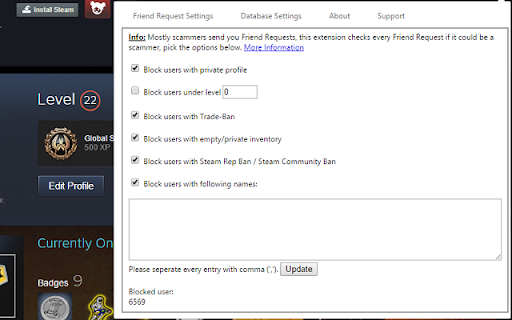
The Project should help the User to get not scammed.
The Tool tries to help people to get not scammed on the platform Steam. And it also improves Trading because you can automatically block/ignore suspicious Steam Users.
This Extension will only work if you're logged in in Steam with your Chrome browser, otherwise it will not have the rights to check your friend requests!
Current Features:
- Block/Ignore Steam Users (automatically) with
-- private profile
-- private inventory
-- trade ban
-- community ban
-- low steam level
-- special names
- Block/Ignore Scammers of Database
- Warnings on csgolounge.com
- Remove suspicious links on csgoulounge.com
Planned Features:
- List with verified Trader/Middlemen
- Report Scammer
- Csgolounge/Dota2lounge Anti-Scam
- some other little things
| 分类 | ♿无障碍访问 |
| 插件标识 | cgblflmbnloiehglnomemjkhpeebbgfl |
| 平台 | Chrome |
| 评分 |
☆☆☆☆☆
|
| 评分人数 | |
| 插件主页 | https://chromewebstore.google.com/detail/steam-anti-scam-project/cgblflmbnloiehglnomemjkhpeebbgfl |
| 版本号 | 2.19.1 |
| 大小 | 57.58KiB |
| 官网下载次数 | 398 |
| 下载地址 | |
| 更新时间 | 2022-08-23 00:00:00 |
CRX扩展文件安装方法
第1步: 打开Chrome浏览器的扩展程序
第2步:
在地址栏输入: chrome://extensions/
第3步: 开启右上角的【开发者模式】
第4步: 重启Chrome浏览器 (重要操作)
第5步: 重新打开扩展程序管理界面
第6步: 将下载的crx文件直接拖入页面完成安装
注意:请确保使用最新版本的Chrome浏览器