
IndiaEasy Hindi Bengali Telugu in Latin Chrome 插件, crx 扩展下载
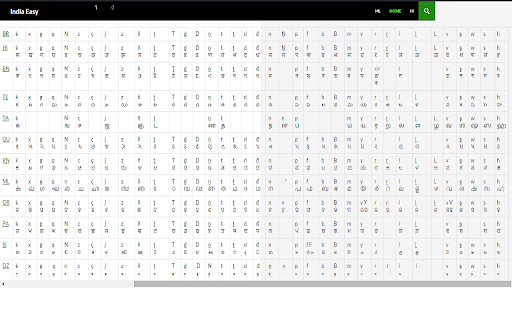
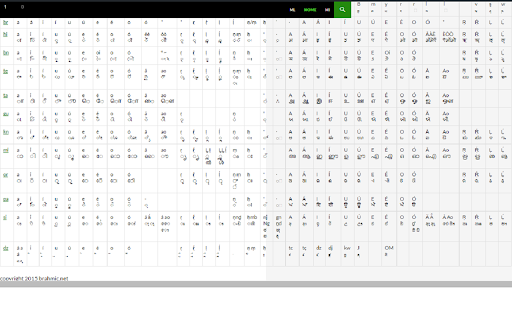
1-click transliterate Marathi Tamil Gujarati Kannada Malayalam Odia Punjabi Assamese Maithili Nepali Sinhalese Tibetan
1) Install the extension and keep the extension icon visible in your toolbar (in Chrome three dots top right - Extensions - Manage Extensions - Indiaeasy - Details - Pin to toolbar)
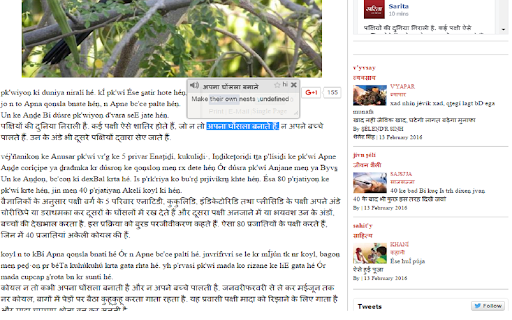
2) Go to your favourite indian/subcontinental language website, then click the indiaeasy icon
3) The page text will be transliterated to the roman alphabet for learners who can't yet quickly read the foreign script
4) You can use another extension (e.g. Simple Translate) to translate the foreign script to your language
Hindi Bangla/Bengali Telugu Marathi Tamil Gujarati Kannada Malayalam Odia Punjabi Nepali Sinhala/Sinhalese Assamese Maithili Tibetan
for websites from India Bangladesh Pakistan Nepal Sri Lanka
install and click icon on non-latin pages to get instant latin version of brahmic web
** use extension "myvocabu" on the original script to get translations, and sometimes audio
great for learning non-latin writing systems. inline transliteration coupled with inline translator is an invaluable learning tool
copyright 2015 Liam Hahne
for Arabic scripts go to ArabEasy.net (also Persian/Farsi and Urdu)
for Thai/Myanmar/Khmer/Lao go to MekongEasy.net (Cambodia Laos Burma Thailand)
for Russian go to RussianEasy.net
| 分类 | 📝工作流程与规划 |
| 插件标识 | cgfmkgolkhiilnnedjkiohjkfikfgebo |
| 平台 | Chrome |
| 评分 |
☆☆☆☆☆
|
| 评分人数 | |
| 插件主页 | https://chromewebstore.google.com/detail/indiaeasy-hindi-bengali-t/cgfmkgolkhiilnnedjkiohjkfikfgebo |
| 版本号 | 25.2.3.0 |
| 大小 | 88.67KiB |
| 官网下载次数 | 98 |
| 下载地址 | |
| 更新时间 | 2024-07-22 00:00:00 |
CRX扩展文件安装方法
第1步: 打开Chrome浏览器的扩展程序
第2步:
在地址栏输入: chrome://extensions/
第3步: 开启右上角的【开发者模式】
第4步: 重启Chrome浏览器 (重要操作)
第5步: 重新打开扩展程序管理界面
第6步: 将下载的crx文件直接拖入页面完成安装
注意:请确保使用最新版本的Chrome浏览器