
LinkToId Chrome 插件, crx 扩展下载
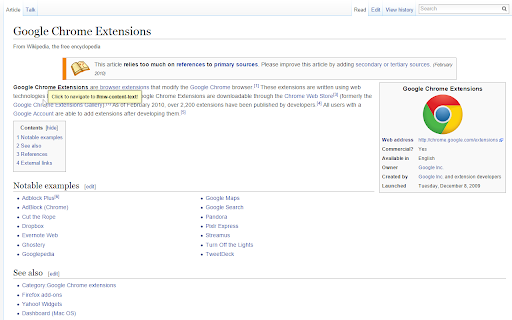
This extension helps to identify and use linkable IDs within a page.
When the fragment identifier (hash part) of an URL matches an element ID, the browser will scroll to that element. This is great if you want to link directly to a particular part or section of a page. LinkToId makes it super easy to identify an element ID and to obtain the URL of said element.
Press Ctrl and Alt to show the LinkToId tooltip, which will identify the closest linkable element. Click the left mouse button while the tooltip is showing to modify the fragment identifier of the current URL. You can now copy the full URL and use it anywhere as a direct link.
LinkToId is currently somewhat limited. If you want to contribute to development or suggest improvement ideas, please visit https://github.com/provegard/LinkToId.
| 分类 | 👥社交 |
| 插件标识 | cggiopngamlojpeoliehhppmdphinjen |
| 平台 | Chrome |
| 评分 |
☆☆☆☆☆
|
| 评分人数 | |
| 插件主页 | https://chromewebstore.google.com/detail/linktoid/cggiopngamlojpeoliehhppmdphinjen |
| 版本号 | 3.128.4 |
| 大小 | 14.07KiB |
| 官网下载次数 | 74 |
| 下载地址 | |
| 更新时间 | 2015-01-05 00:00:00 |
CRX扩展文件安装方法
第1步: 打开Chrome浏览器的扩展程序
第2步:
在地址栏输入: chrome://extensions/
第3步: 开启右上角的【开发者模式】
第4步: 重启Chrome浏览器 (重要操作)
第5步: 重新打开扩展程序管理界面
第6步: 将下载的crx文件直接拖入页面完成安装
注意:请确保使用最新版本的Chrome浏览器