
Collate - Collation tool for Google Docs Chrome 插件, crx 扩展下载
A collation tool for Google Docs
Do you research ideas/topics frequently and struggle to maintain a proper documentation for it? This extension will definitely make your life easier.
Collate Chrome Extension makes collating data into a Google Doc convenient and easy. Just enter the Google Doc link once or create a new Google Doc and you're good to go!
How to use?
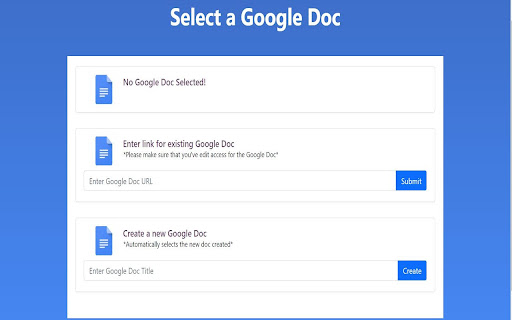
Step 1: When you first click on the Collate icon, you will be taken to a webpage where you can either use an existing Google document or create a new Google Document. To use an exiting Google Document, all you have to do is enter its link in the box and click Submit!
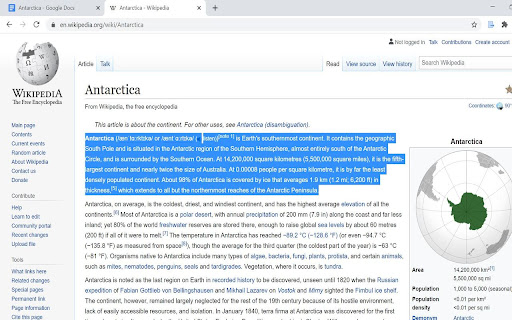
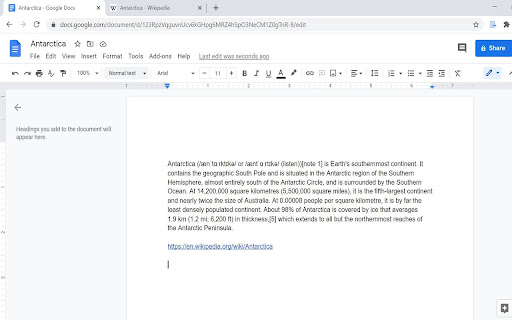
Step 2: That's it! Now, you can select any text on any website and simply click on the Collate icon which will append the text and the website's URL to your Google Doc!
| 分类 | 📝工作流程与规划 |
| 插件标识 | cgojodnemgighlggmhilijdnhphkdneg |
| 平台 | Chrome |
| 评分 |
☆☆☆☆☆
|
| 评分人数 | |
| 插件主页 | https://chromewebstore.google.com/detail/collate-collation-tool-fo/cgojodnemgighlggmhilijdnhphkdneg |
| 版本号 | 1.7.10 |
| 大小 | 1.99MiB |
| 官网下载次数 | 293 |
| 下载地址 | |
| 更新时间 | 2021-02-17 00:00:00 |
CRX扩展文件安装方法
第1步: 打开Chrome浏览器的扩展程序
第2步:
在地址栏输入: chrome://extensions/
第3步: 开启右上角的【开发者模式】
第4步: 重启Chrome浏览器 (重要操作)
第5步: 重新打开扩展程序管理界面
第6步: 将下载的crx文件直接拖入页面完成安装
注意:请确保使用最新版本的Chrome浏览器