
Kodebrikkesjekken Chrome 插件, crx 扩展下载
Kodebrikkesjekken protects against fraud and ID theft for Norwegian BankID
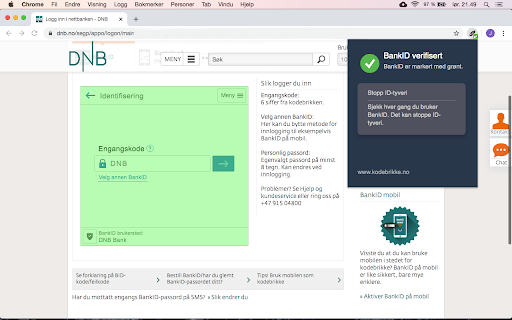
Kodebrikkesjekken verifies that BankID is authentic.
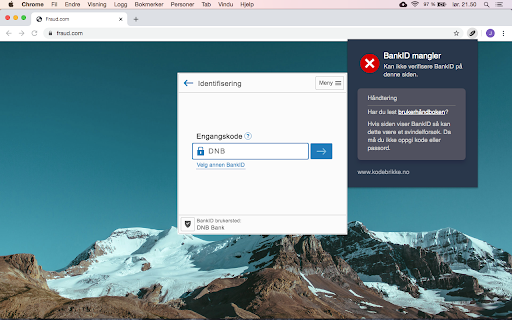
When typing your one time code or passord the toolbar icon is marked with a ✔-badge and a textual reminder to check for this is given. You should only type your credentials if the badge is visible.
Verification can also be initiated from the icon next to the address bar. Any valid BankID will be marked in green. A warning is given if BankID can not be verified. Read the user guide to learn how BankID on mobile is supported.
By downloading this extension you confirm that you accept the license agreement: https://www.kodebrikke.no/eula.html
| 分类 | 📝工作流程与规划 |
| 插件标识 | chbfeembpnjjnboebbicmobjcaidnaga |
| 平台 | Chrome |
| 评分 |
☆☆☆☆☆
|
| 评分人数 | |
| 插件主页 | https://chromewebstore.google.com/detail/kodebrikkesjekken/chbfeembpnjjnboebbicmobjcaidnaga |
| 版本号 | 25.2.3.0 |
| 大小 | 101KiB |
| 官网下载次数 | 162 |
| 下载地址 | |
| 更新时间 | 2021-07-24 00:00:00 |
CRX扩展文件安装方法
第1步: 打开Chrome浏览器的扩展程序
第2步:
在地址栏输入: chrome://extensions/
第3步: 开启右上角的【开发者模式】
第4步: 重启Chrome浏览器 (重要操作)
第5步: 重新打开扩展程序管理界面
第6步: 将下载的crx文件直接拖入页面完成安装
注意:请确保使用最新版本的Chrome浏览器