
Add to Calendar Chrome 插件, crx 扩展下载
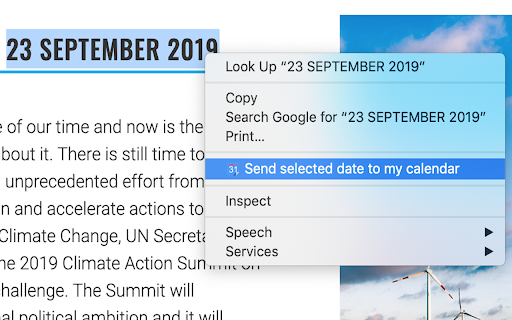
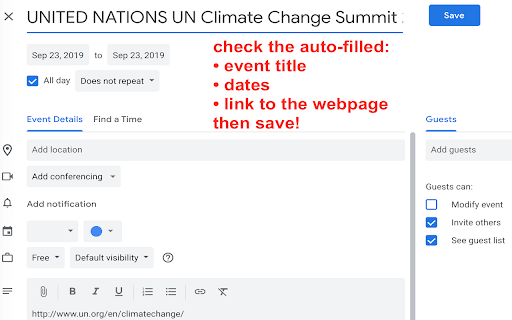
Select a date on any webpage and add it to your calendar with automatically filled details, including a link to the webpage
A simple extension to select dates on any webpage and add them to your Google calendar.
Simply select the date, right click and choose: "Send selected date to my calendar".
The date together with automatically gathered data from the webpage will be added to a new event in your calendar. Review the details and Save the event.
Please note that:
1) This extension only works with Google Calendar
2) In addition to the selected date, title of the webpage will be added as event name, a link to the webpage will be included into the details of the event.
3) The extension detects different date formats, however, always double check the auto-filled data before saving the event. I will not be responsible if you miss an important date!
Otherwise, Enjoy!
| 分类 | 📝工作流程与规划 |
| 插件标识 | ciamdnecdjnljmaaoneckkojbdbkmdhe |
| 平台 | Chrome |
| 评分 |
☆☆☆☆☆
|
| 评分人数 | |
| 插件主页 | https://chromewebstore.google.com/detail/add-to-calendar/ciamdnecdjnljmaaoneckkojbdbkmdhe |
| 版本号 | 1.4 |
| 大小 | 134KiB |
| 官网下载次数 | 552 |
| 下载地址 | |
| 更新时间 | 2019-03-13 00:00:00 |
CRX扩展文件安装方法
第1步: 打开Chrome浏览器的扩展程序
第2步:
在地址栏输入: chrome://extensions/
第3步: 开启右上角的【开发者模式】
第4步: 重启Chrome浏览器 (重要操作)
第5步: 重新打开扩展程序管理界面
第6步: 将下载的crx文件直接拖入页面完成安装
注意:请确保使用最新版本的Chrome浏览器