
Cambly Enhancement Suite Chrome 插件, crx 扩展下载

A set of features to improve the Cambly experience.
Improves the TUTOR'S experience teaching at Cambly by providing enhancements to the Cambly classroom!
Classroom Features:
v.1.1.1:
- Update extension to work with changes made by Cambly
v.1.1.0:
* Classroom - Choose your own background color
* Classroom - Option to cycle background color
* Classroom - Auto-close "Student Preferences" popup
* Reservation Page - "Confirm All" button for reservation requests
* Reservation Page - Create a weekly schedule for your regulars (BETA)
- Update extension to work with changes made by Cambly
v.1.0.6:
- Update extension to work with changes made by Cambly
- Move "Fullscreen" button to between video panel and control panel
- Relocate "Reminders" to center of navigation bar
v1.0.5:
* Show even older message with new "More" link in Chat
* Hotkeys for Student Volume Control (Ctrl+Shift+Up, Ctrl+Shift+Down)
- Fix "Video Swap" for Cambly Kids classrooms
- Fix Student Name link uses new Cambly profile urls
v1.0.4: (***Enable from options page)
*** "Reminders": Display customizable reminders in NavBar
* Add "Useful Links" section to Options Page
* Add "Options Page" button to classroom
* Simplify feature descriptions on options page
- Fix "Previous Lesson Chat" issue
- Fix "Old Exit Button" appearing as empty button
- Fix "Incoming Call Alert" getting stuck with background red
- Fix "Video Layout" when class begins with lesson content open
v1.0.3: (***Enable from options page)
*** Full volume control (replaces "Mute" button)
*** Go back to old-style, smaller "Exit Class" button
* Improve compatibility with new Cambly Speed Dial button.
* Improve compatibility with Cambly alternative video service provider
v1.0.2:
- Flash classroom background upon new incoming call
*** Warmup Screen - automatically check checkboxes
- Fullscreen button - toggle between fullscreen and windowed mode
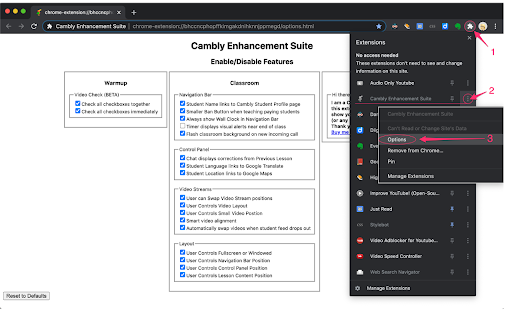
- Options Page (chrome-extension://cjafgfpjmkofakmllcbggmphkpcdippo/options.html)
v1.0.1:
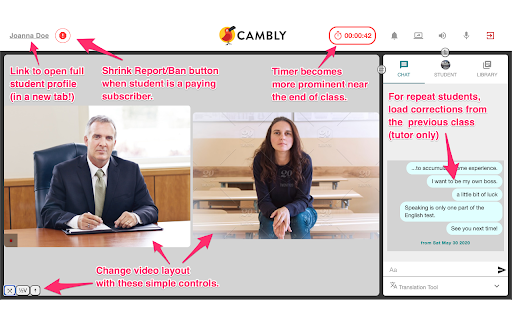
- Customize Layout - change classroom layout to fit your teaching setup and your eye-line to the camera.
*** End of Class Alert - timer lights up to warn the tutor as the class comes to an end.
- Show Prior Corrections - when teaching repeat students, display corrections from previous class with that student; use this to remember who the student is and review what you taught them in the last lesson.
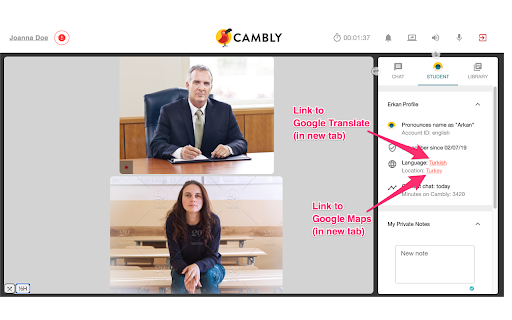
- Quick Links (open in new tab):
- Student Name - links to full student profile
- Student Language - links to Google Translate page for student's language
- Student Location - links to Google Maps for student's country
- Smaller "Report/Ban" button when teaching students with paid accounts.
Note: This extension is NOT created by Cambly and is NOT for students. It is intended to improve the tutor teaching experience only. Thank you! :)
Problems?
- You can quickly disable the entire extension by Right-Clicking on the Bird icon in your Chrome Toolbar.
- You can disable individual features from the options page
- This extension will never cause connection or video problems. If you experience connection or video problems, please check the normal Cambly status page or contact Cambly Tech Support.
- If you experience classroom layout or visual elements errors, you can make sure it is not caused by this extension by disabling it (Right-Click on the Bird icon in your Chrome Toolbar) and reloading the classroom.
| 分类 | 📝工作流程与规划 |
| 插件标识 | cjafgfpjmkofakmllcbggmphkpcdippo |
| 平台 | Chrome |
| 评分 |
☆☆☆☆☆
|
| 评分人数 | |
| 插件主页 | https://chromewebstore.google.com/detail/cambly-enhancement-suite/cjafgfpjmkofakmllcbggmphkpcdippo |
| 版本号 | 25.2.3.0 |
| 大小 | 182KiB |
| 官网下载次数 | 1000 |
| 下载地址 | |
| 更新时间 | 2021-08-07 00:00:00 |
CRX扩展文件安装方法
第1步: 打开Chrome浏览器的扩展程序
第2步:
在地址栏输入: chrome://extensions/
第3步: 开启右上角的【开发者模式】
第4步: 重启Chrome浏览器 (重要操作)
第5步: 重新打开扩展程序管理界面
第6步: 将下载的crx文件直接拖入页面完成安装
注意:请确保使用最新版本的Chrome浏览器