
GTM Preview Copy Tool Chrome 插件, crx 扩展下载
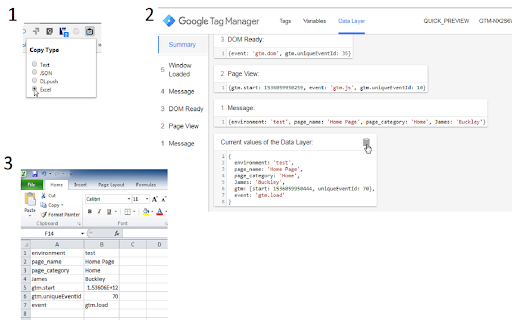
Adds a copy button to each GTM Preview window dataLayer card, for copying data in specific formats.
Shows a small clipboard icon in the GTM Preview window dataLayer cards when moused-over so that the data can be copied in the following formats:
- Text (exactly as shown in the card)
- JSON (creates a valid equivalent JSON object)
- DL.push (creates an example dataLayer push to output the same data)
- Excel (tab delimited so that it can be copied into a 2-column Excel table)
Change the copy type by clicking on the Extension icon in the toolbar.
Some known issues:
- If the Preview Pane loads for a site in an iframe, the clipboard button doesn't appear.
- The copy type pop-up window looks ugly as s**t.
To Do:
- Fix the above issues.
- Make the icon become "enabled" when the extension loads successfully, something which is currently indicated by a console log.
Github
- https://github.com/JibbyJames/GTM-Preview-Copy-Tool
| 分类 | 📝工作流程与规划 |
| 插件标识 | clelhaioaodkbbhpdpminnjfdccbjpgc |
| 平台 | Chrome |
| 评分 |
☆☆☆☆☆
|
| 评分人数 | |
| 插件主页 | https://chromewebstore.google.com/detail/gtm-preview-copy-tool/clelhaioaodkbbhpdpminnjfdccbjpgc |
| 版本号 | 25.2.3.0 |
| 大小 | 68.01KiB |
| 官网下载次数 | 55 |
| 下载地址 | |
| 更新时间 | 2018-09-04 00:00:00 |
CRX扩展文件安装方法
第1步: 打开Chrome浏览器的扩展程序
第2步:
在地址栏输入: chrome://extensions/
第3步: 开启右上角的【开发者模式】
第4步: 重启Chrome浏览器 (重要操作)
第5步: 重新打开扩展程序管理界面
第6步: 将下载的crx文件直接拖入页面完成安装
注意:请确保使用最新版本的Chrome浏览器