
HumbleBundle Keys Clipboard Chrome 插件, crx 扩展下载
Save your Humble Bundle entitlements & keys data
Quickly copy a list of your Humble Bundle entitlements, save all your Humble Bundle data or filter it!
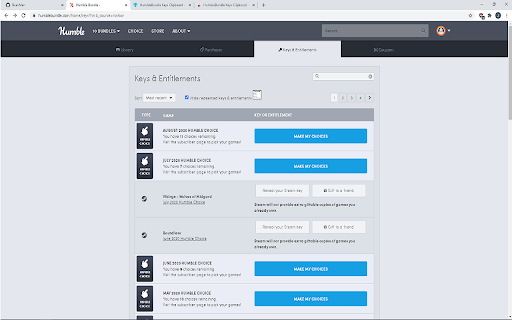
While viewing your Humble Bundle keys & entitlements page,
simply click the button and wait for your file to save or for an alert letting you know that it has copied to your clipboard!
Example of list gathered via scraper: (Humble Choice's optional)
"
Train Valley 2
MotoGP 15
Chasm
Fluffy Horde
JANUARY 2020 HUMBLE CHOICE
5 choices remaining
GRIP + 1 DLC
Middle-earth™: Shadow of War™
Two Point Hospital
Street Fighter V
Whispers of a Machine
Mages of Mystralia
Unrailed!
"
The API call option can gather more information.
This information can contain: keys, download links, steam app ID, expiration, country restrictions and more!
Suggestions? Comments? or ???
Please feel free to reach out I would love to hear some feedback.
Discord: https://discord.gg/tgP8Mqh
or via contact on store page.
---- v0.78 Release Notes ---
Scraper hotfix
Some monthly choices no longer list remaining choices in their description.
It was breaking the scraper if found and fetching.
| 分类 | 📝工作流程与规划 |
| 插件标识 | cmepjcombnmfffjpnnnhmagpmdmnbedg |
| 平台 | Chrome |
| 评分 |
☆☆☆☆☆
|
| 评分人数 | |
| 插件主页 | https://chromewebstore.google.com/detail/humblebundle-keys-clipboa/cmepjcombnmfffjpnnnhmagpmdmnbedg |
| 版本号 | 25.2.3.0 |
| 大小 | 23.14KiB |
| 官网下载次数 | 185 |
| 下载地址 | |
| 更新时间 | 2022-07-17 00:00:00 |
CRX扩展文件安装方法
第1步: 打开Chrome浏览器的扩展程序
第2步:
在地址栏输入: chrome://extensions/
第3步: 开启右上角的【开发者模式】
第4步: 重启Chrome浏览器 (重要操作)
第5步: 重新打开扩展程序管理界面
第6步: 将下载的crx文件直接拖入页面完成安装
注意:请确保使用最新版本的Chrome浏览器