
Blurry Blur Sensitive Infos, Draw & Highlight Chrome 插件, crx 扩展下载

Hide Sensitive Infos & Draw Or Highlight Text While Screen Sharing Or Video Recording. Save Hours Of Post Video Editing Hassles
Grab a license - Get 50% Off : https://blurdata.net/
Have you been in a situation where you need to hide sensitive information, draw lines, or highlight text while screen sharing or video recording?
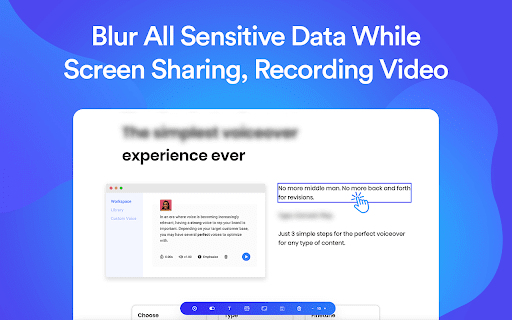
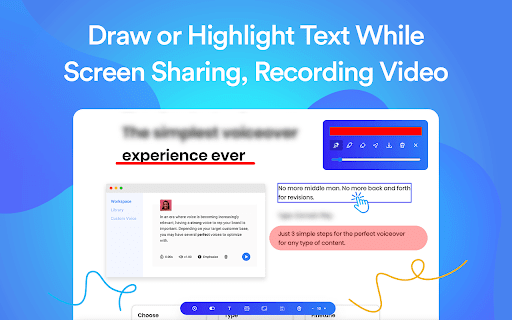
? Blurry is the simple solution to blur any sensitive information with a single click. Also helps you draw lines and highlight texts or inputs. Visit: blurdata.net
? Blurry Blurring and Drawing Hot Features:
- Chrome Extension (Works on Opera too).
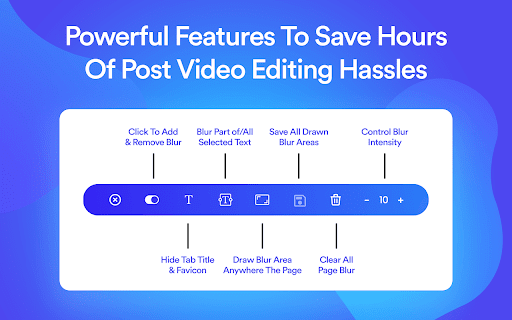
- Add Or Remove Blur With One Single Click.
- Blur Part/All Selected Text With One Single Click.
- Draw Blur Area Anywhere The Page.
- Save All Blur Areas Even After Reloading The Page.
- Control Blur Intensity, Hide Tab Title & Favicon, Clear All Blur.
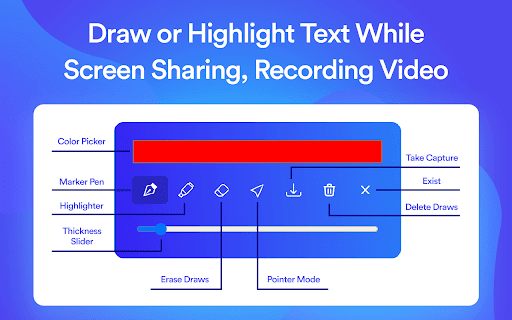
- Marker Color Picker.
- Marker Pen.
- Marker Highlighter.
- Erase Draws.
- Thickness Slider.
- Take a Screenshot.
| 分类 | 📝工作流程与规划 |
| 插件标识 | cohnecpfcfoihjedibnggaoaibnphoeo |
| 平台 | Chrome |
| 评分 |
☆☆☆☆☆
|
| 评分人数 | |
| 插件主页 | https://chromewebstore.google.com/detail/blurry-blur-sensitive-inf/cohnecpfcfoihjedibnggaoaibnphoeo |
| 版本号 | 4.2.6 |
| 大小 | 22.89KiB |
| 官网下载次数 | 544 |
| 下载地址 | |
| 更新时间 | 2022-02-22 00:00:00 |
CRX扩展文件安装方法
第1步: 打开Chrome浏览器的扩展程序
第2步:
在地址栏输入: chrome://extensions/
第3步: 开启右上角的【开发者模式】
第4步: 重启Chrome浏览器 (重要操作)
第5步: 重新打开扩展程序管理界面
第6步: 将下载的crx文件直接拖入页面完成安装
注意:请确保使用最新版本的Chrome浏览器