
Arbitrage Chrome 插件, crx 扩展下载
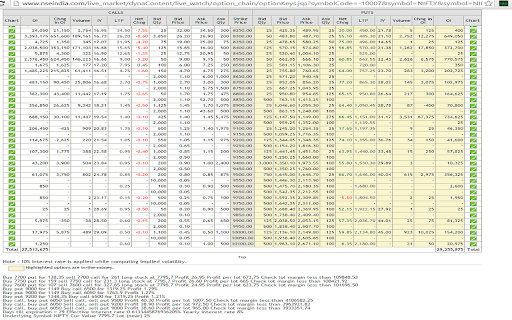
On NSE option chain page scroll to the bottom to see if any arbitrage opportunities were found. Send feedback to [email protected]
Quickly find out if there are any option arbitrage strategies for a given option on the NSE (National Stock Exchange - India).
Install the extension and go to a page like http://www.nseindia.com/live_market/dynaContent/live_watch/option_chain/optionKeys.jsp?symbolCode=-10007&symbol=NIFTY&symbol=NIFTY&instrument=OPTIDX&date=-&segmentLink=17&segmentLink=17
and if there are option arbitrage possibilities, the tool will show them at the bottom of the option chain.
Disclaimer: Trade at your own risk after doing your own research, this is not a recommendation to buy or sell.
| 分类 | 📝工作流程与规划 |
| 插件标识 | copoikkfmogejibilnlmcpigihokanne |
| 平台 | Chrome |
| 评分 |
☆☆☆☆☆
|
| 评分人数 | |
| 插件主页 | https://chromewebstore.google.com/detail/arbitrage/copoikkfmogejibilnlmcpigihokanne |
| 版本号 | 25.2.3.0 |
| 大小 | 66.25KiB |
| 官网下载次数 | 146 |
| 下载地址 | |
| 更新时间 | 2015-10-08 00:00:00 |
CRX扩展文件安装方法
第1步: 打开Chrome浏览器的扩展程序
第2步:
在地址栏输入: chrome://extensions/
第3步: 开启右上角的【开发者模式】
第4步: 重启Chrome浏览器 (重要操作)
第5步: 重新打开扩展程序管理界面
第6步: 将下载的crx文件直接拖入页面完成安装
注意:请确保使用最新版本的Chrome浏览器