
Rainbow JSON Formatter Chrome 插件, crx 扩展下载
Makes JSON easy to read. Open source.
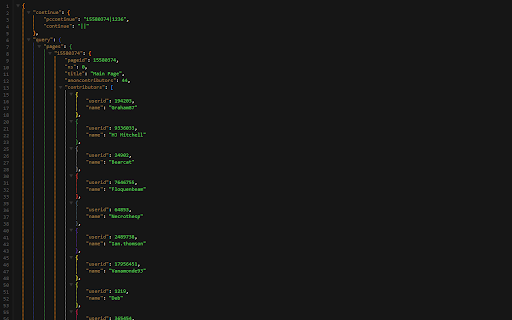
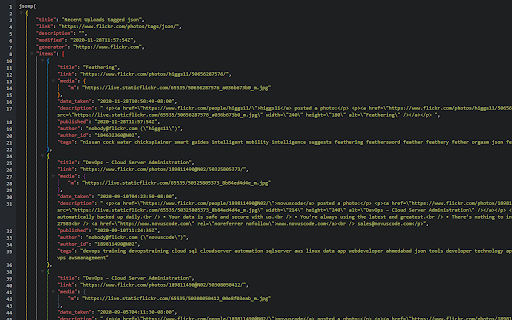
Makes JSON easy to read by formatting it and apply different colors for bracket pairs.
=== Features ===
- JSON & JSONP support
- Rainbow colors for bracket pairs
- Syntax highlighting with 36 light and dark themes
- Line numbers
- Clickable URLs
- Toggle between raw and parsed JSON
- Works on local files too (if you enable this in chrome://extension)
- You can inspect the JSON by typing "json" in the console
Note: This extension might clash with other JSON beautifiers, make sure you're using only one of them.
=== Privacy ===
No tracking, no advertising.
=== Source Code ===
https://github.com/vitozev/rainbow-json-formatter
=== Bugs & Improvement Requests
https://github.com/vitozev/rainbow-json-formatter/issues
=== Pro Tip ===
Hold down the Ctrl (or Cmd on Mac) key while collapsing a tree if you want to collapse all its siblings as well.
| 分类 | 💻开发者工具 |
| 插件标识 | dbiolbddipbicaokllijphafkgbedhcm |
| 平台 | Chrome |
| 评分 |
☆☆☆☆☆
|
| 评分人数 | |
| 插件主页 | https://chromewebstore.google.com/detail/rainbow-json-formatter/dbiolbddipbicaokllijphafkgbedhcm |
| 版本号 | 0.7.3 |
| 大小 | 52.65KiB |
| 官网下载次数 | 704 |
| 下载地址 | |
| 更新时间 | 2020-12-02 00:00:00 |
CRX扩展文件安装方法
第1步: 打开Chrome浏览器的扩展程序
第2步:
在地址栏输入: chrome://extensions/
第3步: 开启右上角的【开发者模式】
第4步: 重启Chrome浏览器 (重要操作)
第5步: 重新打开扩展程序管理界面
第6步: 将下载的crx文件直接拖入页面完成安装
注意:请确保使用最新版本的Chrome浏览器