
One Click URL Decoder Chrome 插件, crx 扩展下载
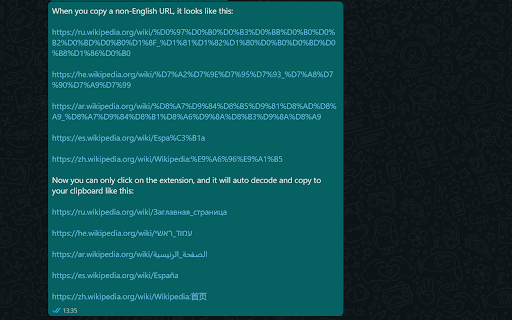
Just click on the icon. It will decode and copy to your clipboard. Then press Ctrl+V
Decode URL - just one click away from pasting the beautiful original URL.
When you copy a non URL with non-English letters - you will paste it, and it will be one mess, super long, and not user-friendly. This extension makes all problems disappear - click and paste.
Here is why I made this extension:
Copy and paste a messy URL make me angry, so I found a website that can decode the URL (https://meyerweb.com/eric/tools/dencoder/), but I too many steps. So I create this small extension with only one step - one click.
[This open-source project]
For any problems or suggestions - please reach me on Github \ Facebook \ Linkedin
Thanks,
Kirill
| 分类 | 💻开发者工具 |
| 插件标识 | dcahbeljhdhmphlddfafboghngpnhjgg |
| 平台 | Chrome |
| 评分 |
☆☆☆☆☆
|
| 评分人数 | |
| 插件主页 | https://chromewebstore.google.com/detail/one-click-url-decoder/dcahbeljhdhmphlddfafboghngpnhjgg |
| 版本号 | 115.0 |
| 大小 | 8.95KiB |
| 官网下载次数 | 33 |
| 下载地址 | |
| 更新时间 | 2021-11-12 00:00:00 |
CRX扩展文件安装方法
第1步: 打开Chrome浏览器的扩展程序
第2步:
在地址栏输入: chrome://extensions/
第3步: 开启右上角的【开发者模式】
第4步: 重启Chrome浏览器 (重要操作)
第5步: 重新打开扩展程序管理界面
第6步: 将下载的crx文件直接拖入页面完成安装
注意:请确保使用最新版本的Chrome浏览器