
Quick Symbols Chrome 插件, crx 扩展下载
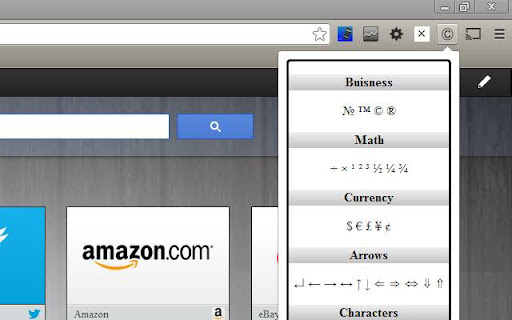
Quick access to text symbols!
Quick Symbols gives you quick access to those pesky text symbols which you never seem to have a copy of.
Version Log:
V 2.0 21/07/2013 Interface reset
V 1.9.5 13/07/2013 Interface redesign (BROKEN)
V 1.4 10/07/2013 Character and Extras sections added, display thinner
V 1.2.5 07/10/2012 Currency and Arrows sections added
V 1.0 25/09/2012 Redesign
V 0.1 22/09/2012 Initial release to the chrome web store with limited selection
Copyright and license
Copyright 2013 Peckitt Software
Licensed under the Apache License, Version 2.0 (the "License"); you may not use this file except in compliance with the License. You may obtain a copy of the License at
http://www.apache.org/licenses/LICENSE-2.0
Unless required by applicable law or agreed to in writing, software distributed under the License is distributed on an "AS IS" BASIS, WITHOUT WARRANTIES OR CONDITIONS OF ANY KIND, either express or implied. See the License for the specific language governing permissions and limitations under the License.
| 分类 | ♿无障碍访问 |
| 插件标识 | dceoiidkfhhanonbdibabhofnignbkbh |
| 平台 | Chrome |
| 评分 |
☆☆☆☆☆
|
| 评分人数 | |
| 插件主页 | https://chromewebstore.google.com/detail/quick-symbols/dceoiidkfhhanonbdibabhofnignbkbh |
| 版本号 | 2.19.1 |
| 大小 | 10.36KiB |
| 官网下载次数 | 260 |
| 下载地址 | |
| 更新时间 | 2014-01-11 00:00:00 |
CRX扩展文件安装方法
第1步: 打开Chrome浏览器的扩展程序
第2步:
在地址栏输入: chrome://extensions/
第3步: 开启右上角的【开发者模式】
第4步: 重启Chrome浏览器 (重要操作)
第5步: 重新打开扩展程序管理界面
第6步: 将下载的crx文件直接拖入页面完成安装
注意:请确保使用最新版本的Chrome浏览器