
LEO.org simple translator Chrome 插件, crx 扩展下载
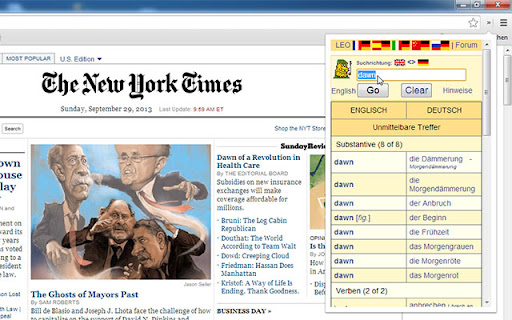
Easily translate words from any website within your browser — with auto-focus!
An easy popup to translate words on the fly.
With auto-focus on the search field and relocating the ads to be less disturbing for this experience.
No own ads injected!
Minimal required permissions needed!
This extension uses leo.org!
///////////////////////////////////////////////////////
////
//// I AM NOT AFFILIATED WITH LEO.ORG
//// THEY MAY CHANGE THEIR PAGE BAHAVIOUR AT ANY TIME
//// NO GUARANTUEE
////
///////////////////////////////////////////////////////
CHANGELOG
--------------------------
v0.3
- updated ffor the new page
v0.2
- Added Icons
- Updated to reflect the new mobile page of leo.org
| 分类 | 📝工作流程与规划 |
| 插件标识 | deaclfigjkibbihdmbbgehagajpfbkmi |
| 平台 | Chrome |
| 评分 |
☆☆☆☆☆
|
| 评分人数 | |
| 插件主页 | https://chromewebstore.google.com/detail/leoorg-simple-translator/deaclfigjkibbihdmbbgehagajpfbkmi |
| 版本号 | 0.3 |
| 大小 | 64.77KiB |
| 官网下载次数 | 168 |
| 下载地址 | |
| 更新时间 | 2017-10-31 00:00:00 |
CRX扩展文件安装方法
第1步: 打开Chrome浏览器的扩展程序
第2步:
在地址栏输入: chrome://extensions/
第3步: 开启右上角的【开发者模式】
第4步: 重启Chrome浏览器 (重要操作)
第5步: 重新打开扩展程序管理界面
第6步: 将下载的crx文件直接拖入页面完成安装
注意:请确保使用最新版本的Chrome浏览器