
Traffic Light SEO Chrome 插件, crx 扩展下载
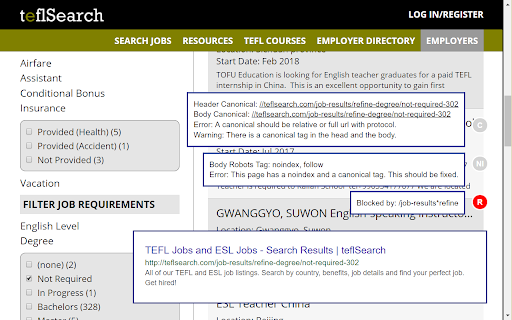
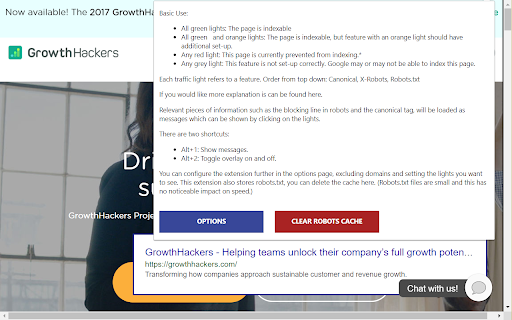

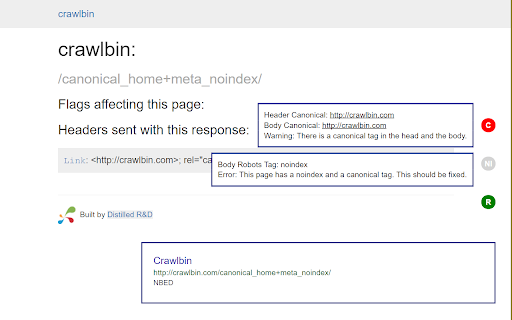
This extension will show basic SEO information about the page in coloured lights.
This plugin tries to answer two questions as you're browsing around:
1. Is a page indexable?
2. What would that page look like in Google?
It uses traffic lights on the left hand side of the page and a pop-up to show you this.
You can see the screenshots for example of what this creates above. It's excellent for general awareness while browsing as well as raising awareness of SEO problems if it's installed on a wider team. (For example getting people to pay attention to what pages might look like in Google.)
To generate this information it looks at canonical in the page and headers, robots tags in the page and headers and the robots.txt file.
- You can customise the traffic lights
- You can customise the domains it appears on
- You can toggle it on and off with a shortcut
| 分类 | 📝工作流程与规划 |
| 插件标识 | defnpiiopkbhkljhlheggmiigooagdoh |
| 平台 | Chrome |
| 评分 |
☆☆☆☆☆
|
| 评分人数 | |
| 插件主页 | https://chromewebstore.google.com/detail/traffic-light-seo/defnpiiopkbhkljhlheggmiigooagdoh |
| 版本号 | 25.2.3.0 |
| 大小 | 37.55KiB |
| 官网下载次数 | 312 |
| 下载地址 | |
| 更新时间 | 2019-01-16 00:00:00 |
CRX扩展文件安装方法
第1步: 打开Chrome浏览器的扩展程序
第2步:
在地址栏输入: chrome://extensions/
第3步: 开启右上角的【开发者模式】
第4步: 重启Chrome浏览器 (重要操作)
第5步: 重新打开扩展程序管理界面
第6步: 将下载的crx文件直接拖入页面完成安装
注意:请确保使用最新版本的Chrome浏览器