
Fuzzy Find Chrome 插件, crx 扩展下载

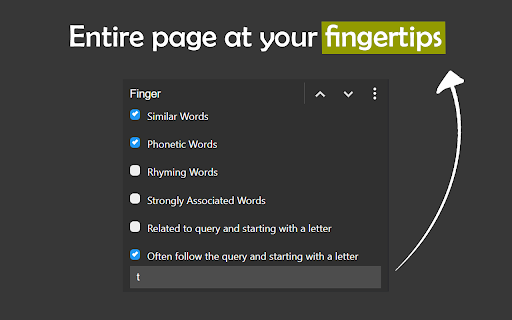
Context based search with advanced options.
The internet is cluttered with data. Although more data is always a good thing, there is an emerging need to segregate and classify relevant data from junk.
Fuzzy Find is an attempt to bridge the gap in development between typical search engines and in-browser search to provide an optimized in-browser search functionality.
Fuzzy Find can match words on a page which even vaguely relate to the words you type in!
Using the extension is as simple as pressing install above and then pressing the keyboard combination Alt + Shift + F.
NOTE: Fuzzy Find is currently in development and made available only for testing. In case of any bugs or improvements, please contact at [email protected] or [email protected]
FEATURES
- Matching words on a page that share meaning similar to the query.
- Matching words on a page that have similar phonetic sound. [Homophones]
- Find words that are spelled similar to the query words. [Spell correction]
- Querying for words that are strongly related/describe the query phrase.
- Searching for words that are related to the query and start with a particular letter(s).
- Words that often follow a term and start with a particular letter(s).
| 分类 | 🛠️工具 |
| 插件标识 | dfafheanadakbldaidemclfenpkednod |
| 平台 | Chrome |
| 评分 |
☆☆☆☆☆
|
| 评分人数 | |
| 插件主页 | https://chromewebstore.google.com/detail/fuzzy-find/dfafheanadakbldaidemclfenpkednod |
| 版本号 | 1.0.0.47 |
| 大小 | 71.1KiB |
| 官网下载次数 | 214 |
| 下载地址 | |
| 更新时间 | 2022-11-27 00:00:00 |
CRX扩展文件安装方法
第1步: 打开Chrome浏览器的扩展程序
第2步:
在地址栏输入: chrome://extensions/
第3步: 开启右上角的【开发者模式】
第4步: 重启Chrome浏览器 (重要操作)
第5步: 重新打开扩展程序管理界面
第6步: 将下载的crx文件直接拖入页面完成安装
注意:请确保使用最新版本的Chrome浏览器