
Creeper Chrome 插件, crx 扩展下载
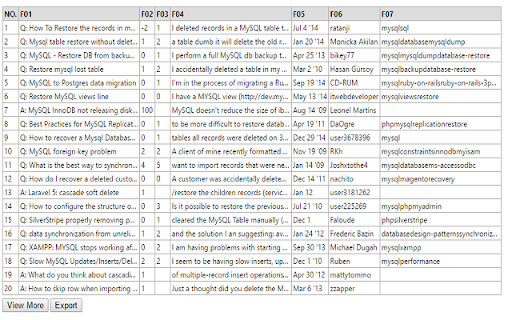
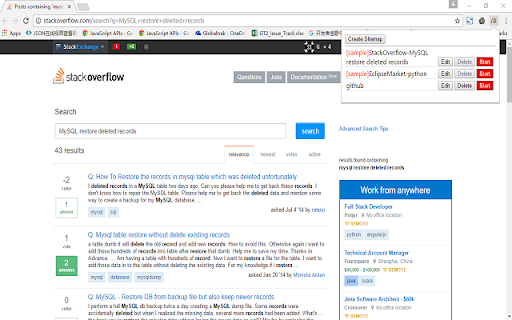
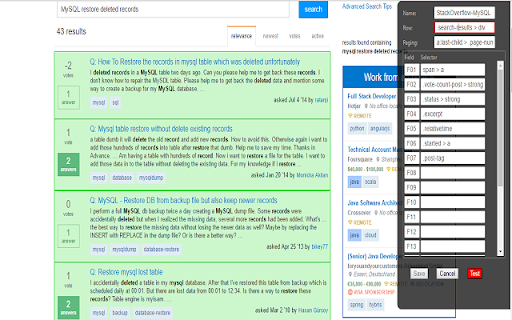
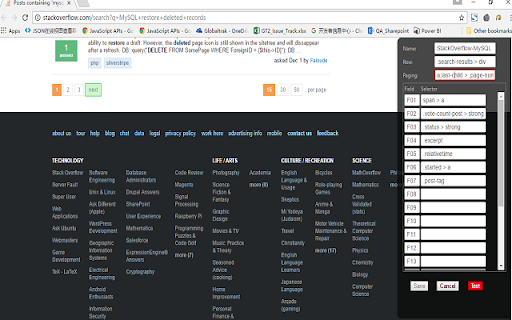
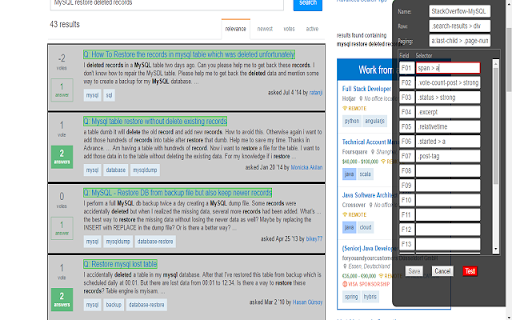
Scrape data from list-style web pages. There are samples for demo. Very easy to use. One minute configuration by just clicking.
Creeper is a scraping extension, focusing on list-style web pages. Users don't need to know any knowledge of html and css, although it is better to know them.
Creeper cannot scrape data from all web pages, but only list-style pages. List-style pages have rows, each of which has almost same fields.
User need to click html elments to tell Creeper which one is row element, which ones are field element, and which one is paging element. Creeper can then generate a sitemap template guide how to capture these data.
There are some list-style pages:
http://stackoverflow.com/search?page=2&tab=relevance&q=mysql%20restore%20deleted%20records
http://marketplace.eclipse.org/search/site/%2522python%2522
https://www.linkedin.com/jobs/?trk=nav_responsive_sub_nav_jobs
Steps to user Creeper:
1) Click the Creeper icon in the right top corner to open sitemap list;
2) Click the button "Create Sitemap" to open a form to define a sitemap for the current opend web page in the browser.
3) Click the button "Edit" to open sitemap detailed form, where you can click "Test" to scrape some sample data.
4) Click the button "Run" to scrape according sitemap.
4) After scraping, data will display in a table. You can export as csv file.
| 分类 | 📝工作流程与规划 |
| 插件标识 | dfcfifdniniafdhnblehebkcnkoncdpj |
| 平台 | Chrome |
| 评分 |
☆☆☆☆☆
|
| 评分人数 | |
| 插件主页 | https://chromewebstore.google.com/detail/creeper/dfcfifdniniafdhnblehebkcnkoncdpj |
| 版本号 | 1.3.6 |
| 大小 | 340KiB |
| 官网下载次数 | 210 |
| 下载地址 | |
| 更新时间 | 2017-01-21 00:00:00 |
CRX扩展文件安装方法
第1步: 打开Chrome浏览器的扩展程序
第2步:
在地址栏输入: chrome://extensions/
第3步: 开启右上角的【开发者模式】
第4步: 重启Chrome浏览器 (重要操作)
第5步: 重新打开扩展程序管理界面
第6步: 将下载的crx文件直接拖入页面完成安装
注意:请确保使用最新版本的Chrome浏览器