
MiniPlay Chrome 插件, crx 扩展下载
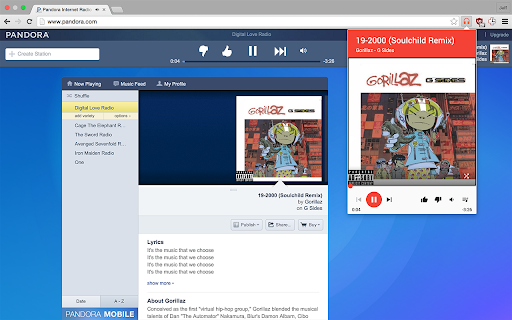


Control Google Music, Pandora, and Spotify with a popup and keyboard shortcuts.
MiniPlay extends Google Play Music, Pandora, and Spotify Web with keyboard shortcuts, a miniplayer, Last.fm scrobbling, rich notifications, and more!
----------------
FEATURES
----------------
- Control playback from a popup
- Browse and search through your library (currently only Google Music is supported)
- Global (Chrome-wide) shortcuts
- Rich notifications with actions
- Last.fm scrobbling
-------------------
PERMISSIONS
-------------------
MiniPlay uses the following permissions:
- Notifications: MiniPlay optionally displays rich notifications when a new song starts
- Storage: MiniPlay associates your settings with your Chrome account, so your settings are consistent across computers
- Tabs: MiniPlay needs to hook into music player tabs to function properly. Also, because some streaming services host their album art images on other domains, MiniPlay requires a more general permission to read data on any website.
-------------------
RECENT UPDATES
-------------------
v0.7.3: Tighten up permissions
v0.7.2: Fix recents page
v0.7.1: Fix Windows popup
v0.7.0: Browse and search your music library (limited to Google Play Music for now)!
v0.6.4: Hotfix for Google Play Music support and performance enhancements
v0.6.3: Fix Last.fm for real
v0.6.2: Fix Google Play Music support (again), and fix Last.fm support
v0.6.1: Fix Google Play Music support
v0.6.0: Add a playlist view, minor visual changes, and speed improvements
v0.5.2: Fix Play/Pause button swap on Google Play
v0.5.1: Fix Google Play Music support
v0.5.0: Beautiful new design and support for Pandora, Spotify Web, and Songza
v0.4.5: More responsive controls
v0.4.3: Add volume slider
v0.4.0: Add time slider and significantly reduce resource usage
v0.3.5: Added Last.fm toggle to the popup
v0.3.4: Revamped settings page
v0.3.3: Enable Google analytics
v0.3.0: Add support for Last.fm scrobbling
v0.2.0: Rich notifications support and an options page
v0.1.0: Initial release
The extension does not collect any information, but requires access to your other tabs for functionality.
MiniPlay is open source (github.com/iambald/MiniPlay)
| 分类 | 🎬娱乐 |
| 插件标识 | dfddfiedihbijfeacjamchlliogmjjnd |
| 平台 | Chrome |
| 评分 |
☆☆☆☆☆
|
| 评分人数 | |
| 插件主页 | https://chromewebstore.google.com/detail/miniplay/dfddfiedihbijfeacjamchlliogmjjnd |
| 版本号 | 5.1.3 |
| 大小 | 937KiB |
| 官网下载次数 | 2000 |
| 下载地址 | |
| 更新时间 | 2021-03-16 00:00:00 |
CRX扩展文件安装方法
第1步: 打开Chrome浏览器的扩展程序
第2步:
在地址栏输入: chrome://extensions/
第3步: 开启右上角的【开发者模式】
第4步: 重启Chrome浏览器 (重要操作)
第5步: 重新打开扩展程序管理界面
第6步: 将下载的crx文件直接拖入页面完成安装
注意:请确保使用最新版本的Chrome浏览器