
Prodwarn Chrome 插件, crx 扩展下载
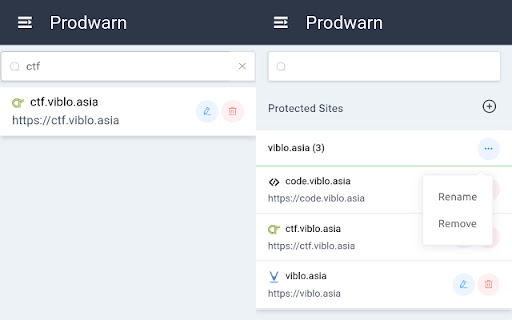

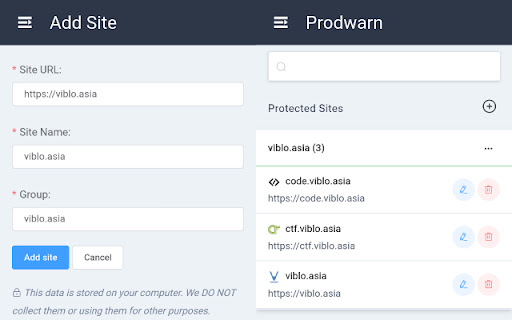
Display warning when using the production sites
■ Introduction:
In A beautiful day, you accidentally test on the production system instead of the dev/test systems when coding. This is a way that the incident is to be.
Prodwarn is a browser extension that will warn us when using the production system instead of the dev/test system. It is an open-source software. Therefore, you can contribute for it on Github.
■ Features:
- Add/Edit/Delete a protected site that should be shown the warning message
- Auto fill current site when adding protected site
- Manage protected sites with Group and Site name
- Search protected sites by name, host
- Whitelist warning for page
- Multiple strategy for warning:
- Float Message (default)
- Dialog (Not implemented yet)
- Watermark (Not implemented yet)
- Supported browsers: Chrome, Firefox, Opera.
■ v0.4.3:
- fix(firefox): does not display warning after adding the production site
- fix(firefox): does not auto-fill the page info when adding the production site
| 分类 | 💻开发者工具 |
| 插件标识 | dgdfcekakoecdmmccembbgjeanedklic |
| 平台 | Chrome |
| 评分 |
☆☆☆☆☆
|
| 评分人数 | |
| 插件主页 | https://chromewebstore.google.com/detail/prodwarn/dgdfcekakoecdmmccembbgjeanedklic |
| 版本号 | 8.3 |
| 大小 | 622KiB |
| 官网下载次数 | 105 |
| 下载地址 | |
| 更新时间 | 2020-06-22 00:00:00 |
CRX扩展文件安装方法
第1步: 打开Chrome浏览器的扩展程序
第2步:
在地址栏输入: chrome://extensions/
第3步: 开启右上角的【开发者模式】
第4步: 重启Chrome浏览器 (重要操作)
第5步: 重新打开扩展程序管理界面
第6步: 将下载的crx文件直接拖入页面完成安装
注意:请确保使用最新版本的Chrome浏览器